What is TidyCal?
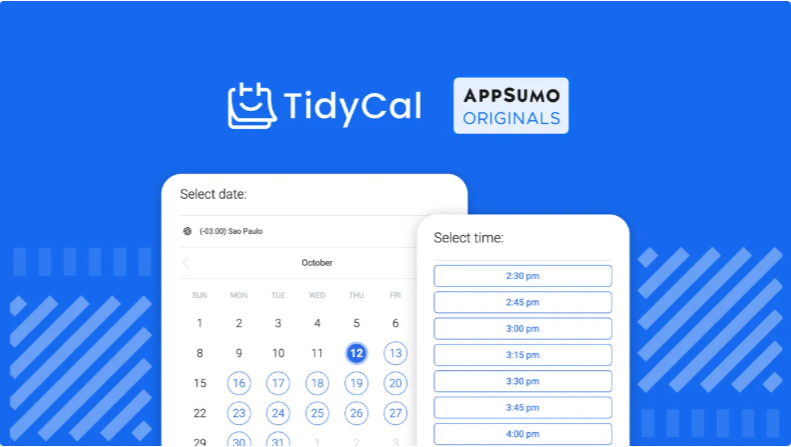
This TidyCal review is for anyone who is tired of sending back-and-forth emails just to schedule a single meeting. TidyCal is an online scheduling and booking tool that lets you set your availability once and share a booking link so clients, teammates, or students can pick a time that works for everyone — automatically, without any email ping-pong involved.
Built by AppSumo Originals and designed specifically for entrepreneurs, freelancers, coaches, and small business owners, TidyCal connects to your existing calendars, auto-generates video call links, handles payment collection, and sends confirmation emails — all from one clean, easy-to-navigate dashboard. Think of it as your personal scheduling assistant that works 24/7 without you lifting a finger.
With over 884 reviews on AppSumo and a 4.36-star rating, TidyCal has become one of the most popular lifetime deal tools in the scheduling space. It positions itself as the affordable, no-fuss alternative to tools like Calendly — and for most users, it delivers on that promise.
How TidyCal Works
Getting started with TidyCal takes less than 15 minutes. Here is the basic flow:
Step 1: Connect your calendar. TidyCal syncs with Google Calendar, Microsoft Outlook, and Apple iCal. Once connected, TidyCal reads your real-time availability and blocks off times you are already booked, so double bookings become impossible.
Step 2: Create your booking types. You can set up as many booking event types as you need — a 15-minute discovery call, a 1-hour consultation, a group workshop, or a recurring weekly check-in. Each booking type gets its own link, duration, availability window, and settings.
Step 3: Customize your booking page. Add your branding, set buffer times between meetings, define how far in advance bookings can be made, and add custom questions to your booking form so you collect the information you need before the meeting even starts.
Step 4: Share your link. Drop your booking link into your email signature, website, social media bio, or anywhere else clients might see it. They click, pick a time, and the meeting lands on both calendars automatically — with a Zoom or Google Meet link generated on the spot.
Step 5: Get paid (optional). If you charge for your sessions, you can collect payments via Stripe or PayPal directly through the booking page. No separate invoicing needed.
Tips for Using TidyCal
TidyCal is simple to use out of the box, but a few smart setup habits will get you far more value from it.
Set Up Buffer Times
Always add buffer time between meetings. Even 10 to 15 minutes between sessions gives you time to take notes, grab water, or prepare for your next call. TidyCal lets you set this per booking type, so you can have tighter buffers for quick calls and longer ones for full sessions. This one setting alone prevents the burnout that comes from back-to-back meetings with zero breathing room.
Use Multiple Booking Types
Do not just create one generic booking link. Set up separate event types for different purposes — a free 20-minute intro call, a paid 60-minute deep dive, a group onboarding session. Each gets its own link and can have its own pricing, duration, and availability. This keeps things organized for you and gives clients a clear, professional experience.
Enable Payment Integration
If you offer paid services, connect Stripe or PayPal from day one. TidyCal collects payment at the time of booking, which eliminates the awkward invoice-chasing that eats up time after every session. Setting it up takes about five minutes and works seamlessly once live.
TidyCal Review: Pros and Cons
Here is the honest, no-fluff breakdown from this TidyCal review.
Pros
Incredibly easy to set up. Most users are up and running with a live booking link in under 15 minutes. No technical background required.
Lifetime deal pricing. Pay once and use TidyCal forever. Compared to Calendly’s recurring subscription model, this is a massive long-term saving for any freelancer or small business owner.
Multiple calendar integrations. Syncs with Google Calendar, Microsoft Outlook, and Apple iCal. You can connect multiple calendars to prevent any double booking across your personal and professional schedules.
Built-in payment collection. Stripe and PayPal integration lets you charge for sessions directly through the booking page. Paid bookings with zero commission on the lifetime plan.
Automatic video call links. Zoom and Google Meet links are generated automatically when someone books a session. No manual link-sharing needed.
Constantly improving. The TidyCal team has shipped over 500 feature improvements since launch and consistently pushes updates. In 2025 alone, the GitHub showed close to 175 pull requests, meaning near-constant development.
Cons
Limited visual customization. The booking pages are clean and functional, but design options are more basic than what you get with premium tools. Full white-label branding is only available on the Agency plan.
Occasional Microsoft 365 sync issues. Some users have reported intermittent syncing problems with Office 365. This is not universal but worth knowing if Microsoft is your primary calendar.
No native SMS reminders. TidyCal sends email confirmations and reminders but does not offer built-in SMS notifications. You can work around this with Zapier, but it is an extra step.
Lighter on enterprise features. For large teams with complex scheduling needs — like advanced round-robin routing or multi-department scheduling — enterprise tools may serve better.
Top 5 Features of TidyCal
1. Unlimited Booking Types
Create as many booking event types as your business needs. One-on-one calls, group sessions, workshops, recurring meetings — each with its own link, duration, availability, and pricing. There is no limit on the lifetime plan, which makes TidyCal genuinely scalable for growing businesses.
2. Multi-Calendar Sync
Connect multiple Google, Outlook, and Apple calendars simultaneously. TidyCal checks all of them in real time before showing available slots to a booker. This means zero risk of double-booking across your personal and work calendars at the same time.
3. Paid Booking Integration
Accept payments via Stripe or PayPal directly on the booking page with zero commission taken by TidyCal on the lifetime plan. This is a standout feature for coaches, consultants, and freelancers who charge for their time and want payment sorted before the meeting even happens.
4. Date Polls
Send a poll to clients or team members so they can vote on the dates that work best for everyone. This is particularly useful for group sessions or team meetings where coordinating availability across multiple people is otherwise a scheduling nightmare.
5. Zapier and API Integration
Connect TidyCal to thousands of other tools through Zapier or use the API to build custom workflows. This opens up automation possibilities for CRMs, email marketing platforms, project management tools, and more — extending TidyCal well beyond basic scheduling.
TidyCal Alternatives
TidyCal is an excellent tool, but it is not the only option. Here is how it stacks up against the main alternatives:
Calendly — The most well-known scheduling tool on the market. Calendly offers more advanced team features and deeper customization, but pricing runs on a monthly subscription that adds up significantly over time. For solo users and small teams, TidyCal’s lifetime deal is almost always the better financial choice.
Acuity Scheduling — A solid Squarespace-owned tool popular with health and wellness professionals. Acuity has strong intake form and package booking features, but again operates on a subscription model that gets expensive fast.
Cal.com — An open-source scheduling platform with a generous free plan. Cal.com is great for technically inclined users who want full control and customization. However, it requires more setup time and technical comfort than TidyCal.
SimplyBook.me — Feature-rich booking software with strong service and class scheduling. Better suited to businesses with physical locations like salons, gyms, or clinics. More complex than most solo users need.
YouCanBook.me — A clean, reliable booking tool that integrates well with Google Calendar. Subscription-based and has fewer features than TidyCal at a comparable price point.
For most freelancers, coaches, and small business owners, TidyCal wins on value and simplicity over every one of these alternatives.
Why Choose the TidyCal Lifetime Deal
Scheduling tools are not glamorous. They are the kind of software you set up once and rely on every single working day. That makes the pricing model matter enormously over time.
Most scheduling tools charge between $8 and $20 per month on their paid plans. Over three years, that adds up to anywhere from $288 to $720 — and you are still paying at the end of it. TidyCal’s lifetime deal costs a single one-time payment, and the tool is yours permanently with no recurring fees.
Beyond the savings, the TidyCal lifetime deal comes backed by AppSumo’s 60-day money-back guarantee. You get two full months to test every feature, run real bookings, and decide if it fits your workflow — with zero financial risk if it does not. The team also actively develops the product. This is not abandonware. Regular updates, active community engagement, and consistent new feature releases mean the tool you buy today will be meaningfully better in twelve months.
What is the TidyCal Lifetime Deal on AppSumo?
The TidyCal lifetime deal on AppSumo gives you permanent access to the tool for a single one-time payment. No monthly fees, no annual renewals, no surprises. Here is what each plan includes:
Individual Plan: Ideal for solopreneurs and freelancers managing their own bookings. Includes unlimited booking types, multiple calendar connections, Zoom and Google Meet integration, Stripe and PayPal payment collection, Zapier integration, and zero commission on paid bookings.
Agency Plan: Designed for teams and agencies managing bookings across multiple users. Includes everything in the Individual plan plus round-robin scheduling, collective booking types, team pages, white-label booking pages with agency branding, and managed booking for clients.
Both plans come with AppSumo’s standard 60-day money-back guarantee. If TidyCal does not work for your business within two months, you get a full refund — no questions asked. At the price point TidyCal is offered on AppSumo, it is one of the easiest buying decisions in the lifetime deal space.
TidyCal Review: Summary
This TidyCal review comes to a clear conclusion: for freelancers, coaches, consultants, and small business owners who schedule meetings regularly, TidyCal is one of the best investments available in the lifetime deal market.
It is simple enough for non-technical users to get running in minutes, powerful enough to handle payments, team scheduling, and API integrations for more advanced use cases, and affordable enough that the lifetime deal pays for itself after just a handful of booked sessions. The active development team, consistent feature updates, and strong AppSumo community backing add further confidence that this is a tool worth owning for the long term.
If you are still paying a monthly fee for Calendly or another scheduling tool, the TidyCal lifetime deal deserves a serious look. Two months risk-free is more than enough time to know whether it belongs in your permanent toolkit.
Frequently Asked Questions
Q1: Is TidyCal good for beginners? Yes. TidyCal is designed with simplicity at the forefront. Most users have a live booking link ready within 15 minutes of signing up. No technical background is needed to get started.
Q2: Does TidyCal work with Google Calendar and Outlook? Yes. TidyCal syncs with Google Calendar, Microsoft Outlook, and Apple iCal. You can connect multiple calendars simultaneously to prevent double bookings across all your accounts.
Q3: Can I collect payments through TidyCal? Yes. TidyCal integrates with both Stripe and PayPal. Lifetime plan users pay zero commission on paid bookings, making it an excellent option for coaches and consultants who charge for their sessions.
Q4: How does TidyCal compare to Calendly? TidyCal covers all the core scheduling features most users actually need: booking types, calendar sync, video links, and payment collection. Calendly has more advanced enterprise features and deeper customization, but charges a recurring monthly fee. For most solo users and small teams, TidyCal’s lifetime deal is the smarter financial choice.
Q5: Is there a money-back guarantee on the TidyCal AppSumo deal? Yes. The TidyCal AppSumo lifetime deal comes with a 60-day money-back guarantee. If the tool does not meet your needs within two months, you can request a full refund with no hassle.
Explore our pages: AppSumo Deals, WP Themes & Plugins, JVZoo, DealFuel, Dealify, DealMirror, RocketHub, StackSocial, Others.