What is SendFox?
This SendFox review is for every creator, blogger, podcaster, and small business owner who is tired of paying $50 to $100 every month just to send emails to their audience. SendFox is an email marketing platform built by the AppSumo team specifically for content creators and entrepreneurs who want a simple, affordable, and reliable way to grow and communicate with their email list — without the bloat, complexity, or recurring costs that come with most email tools.
Unlike platforms like Mailchimp or ConvertKit that are built for large marketing teams with enterprise-level budgets, SendFox strips everything back to what actually matters: sending campaigns, building automations, creating landing pages, and growing your list. It is lean by design, and that is exactly the point. Over 22,000 creators rely on SendFox today, including well-known names like author Ryan Holiday and YouTube channel Yoga with Adriene. As an AppSumo Original, it is built and maintained by the same team that runs AppSumo itself.
How SendFox Works
Getting started with SendFox is straightforward, even for complete beginners. Here is how the platform works from signup to your first campaign:
Step 1: Create your account. Sign up directly through SendFox or grab the lifetime deal via AppSumo. Once inside, you are greeted by a clean, minimal dashboard showing your email stats, recent campaigns, and subscriber growth — all in one glance.
Step 2: Build your list. Import existing subscribers via CSV or use SendFox’s built-in Smart Pages (landing pages) and embeddable forms to start collecting new subscribers. Forms can be added directly to your website or blog.
Step 3: Set up your automations. Create trigger-based email sequences for welcome emails, onboarding flows, follow-ups, and content delivery. Once set up, these run on autopilot so you can focus on creating content instead of chasing subscribers.
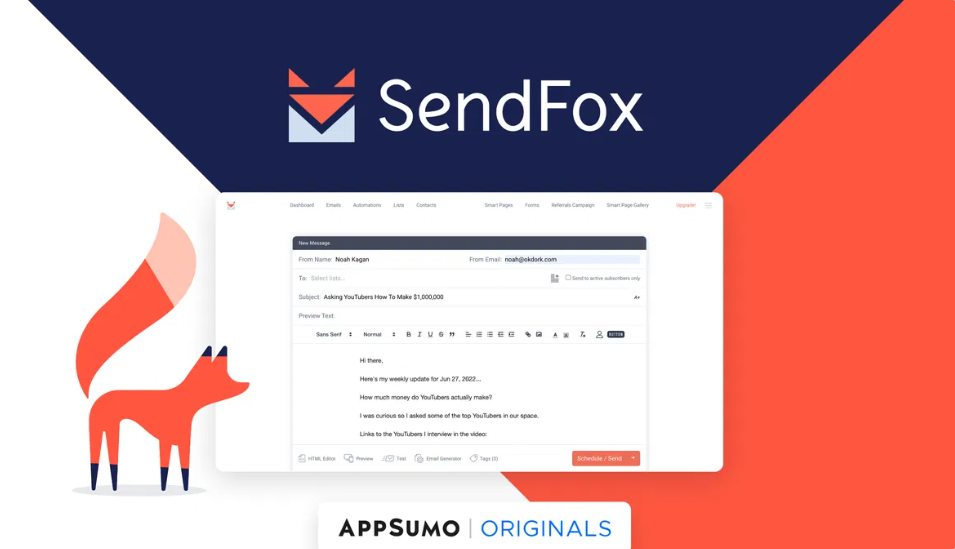
Step 4: Create and send campaigns. Use the built-in WYSIWYG editor to write and design your emails. No coding or HTML knowledge needed. You can schedule one-time campaigns or let Smart Campaigns automatically email your list whenever you publish new content via RSS feed.
Step 5: Track your results. SendFox gives you open rates, click rates, bounce rates, list growth trends, and individual subscriber activity — all from a clean, readable analytics dashboard.
Top 5 Features of SendFox
1. Smart Campaigns
Smart Campaigns are one of SendFox’s most practical features for content creators. Connect your blog’s RSS feed and SendFox will automatically generate and send an email to your subscribers every time you publish new content. For bloggers and podcasters who publish regularly, this effectively automates your entire newsletter with zero extra effort.
2. Email Automation Sequences
Build unlimited triggered automation workflows — welcome sequences, drip campaigns, onboarding flows, promotional follow-ups, and more. Once you map out the sequence and set the triggers, SendFox handles the delivery automatically. You set it up once and it runs in the background indefinitely, keeping your audience engaged without manual work.
3. Smart Pages (Landing Pages and Forms)
SendFox includes a built-in landing page and form builder called Smart Pages. You can create clean, professional subscriber opt-in pages without needing a separate landing page tool. These pages are customizable, mobile-friendly, and can be embedded on your website or shared as standalone links to grow your list from social media or any external source.
4. List Management with Tagging
Organize your subscribers using tags based on their behavior, source, or interests. Tags let you segment your list and send more targeted emails to specific groups, which improves engagement and keeps your content relevant to each subscriber. It is a straightforward system that does not require complex rules or CRM-level setup.
5. Integrations with AppSumo Ecosystem and Zapier
SendFox connects natively with other AppSumo tools like KingSumo (for viral giveaways) and TidyCal (for scheduling), making it a natural fit for entrepreneurs already using the AppSumo ecosystem. Beyond that, Zapier integration opens up connections to thousands of other tools, from CRMs and project management platforms to ecommerce and course builders.
Tips for Using SendFox
SendFox is simple to use, but a few smart habits will make a real difference in your results.
Warm Up Your List Before Blasting
If you are importing a large list or starting from scratch, do not send a mass campaign to everyone on day one. Start by emailing your most engaged subscribers first, then gradually increase your sending volume over a few weeks. This signals to email providers that you are a legitimate sender and protects your deliverability over the long term.
Use Smart Campaigns for Content Updates
If you publish a blog, podcast, or YouTube video regularly, connect your RSS feed and let Smart Campaigns do the heavy lifting. This keeps your list engaged with fresh content automatically and ensures you never miss an opportunity to bring subscribers back to your latest work, even during your busiest weeks.
Segment Your List with Tags
Do not treat your entire list as one group. Use tags to segment subscribers based on how they joined, what content they engage with, or what products they have shown interest in. Even basic segmentation can significantly improve your open rates and click-through rates because you are sending the right content to the right people.
SendFox Review: Pros and Cons
Here is the balanced, no-filler breakdown from this SendFox review.
Pros
Unbeatable lifetime pricing. For a one-time fee starting at $49, you get lifetime access to SendFox with unlimited email sends. Mailchimp charges $59 per month for a comparable subscriber count. The math speaks for itself.
Built specifically for creators. SendFox was designed from the ground up for bloggers, YouTubers, podcasters, and entrepreneurs — not enterprise marketing teams. The feature set reflects exactly what creators actually need, without the clutter they do not.
Clean, beginner-friendly interface. The dashboard is minimal and intuitive. Even someone who has never used an email marketing tool before can set up their first campaign in under 30 minutes.
Unlimited email sends on all paid plans. There is no cap on how many emails you can send per month. Whether you email your list once a week or three times, the cost stays the same.
RSS-powered Smart Campaigns. Automatically email your subscribers when you publish new content. For content-heavy creators, this feature alone is worth the price of the tool.
GDPR compliant. SendFox handles privacy compliance automatically, which is particularly important for creators with international audiences.
Cons
Limited design customization. The email editor is simple and functional but not visually flexible. If you want pixel-perfect branded emails with drag-and-drop design control, SendFox will feel restrictive.
No A/B testing. You cannot natively test subject lines or email content against each other. Performance optimization has to be done manually by tracking campaigns separately.
Basic automation logic. SendFox handles straightforward trigger-based sequences well, but advanced multi-branch automation with conditional logic is not supported. Power users who need complex workflows will find it limiting.
Email delivery can be slow. Some users have reported delays in automation delivery, particularly for immediate post-signup sequences. This is not universal but worth being aware of if instant delivery is critical for your use case.
SendFox branding on lifetime plans. The default lifetime plan includes SendFox branding in outgoing emails. Removing it requires the Empire Add-On at an additional monthly cost.
SendFox Alternatives
SendFox is the best value in its category, but depending on your needs, these alternatives are worth knowing:
MailerLite — A popular and design-friendly email marketing platform with a generous free plan. MailerLite offers more template variety and a better drag-and-drop editor, but it operates on a monthly subscription that grows with your list size.
ConvertKit (now Kit) — Purpose-built for creators and one of the most respected tools in the space. Kit has more powerful automation and segmentation than SendFox, but pricing starts significantly higher and scales up quickly as your list grows.
Mailchimp — The most widely used email marketing platform globally. Mailchimp has deeper analytics, more integrations, and better design tools, but the monthly cost for a mid-sized list can easily run $50 to $100 or more.
MailerLite — A strong mid-ground option with good design tools, automation, and a free plan that covers up to 1,000 subscribers. Better for users who want more design control than SendFox offers.
ActiveCampaign — Enterprise-grade email marketing with advanced CRM functionality, deep automation branching, and powerful segmentation. Significantly more expensive and complex than SendFox, better suited to growing businesses with larger marketing budgets.
For content creators and small business owners who prioritize simplicity and value over advanced features, SendFox still wins on price-to-value ratio by a wide margin.
Why Choose the SendFox Lifetime Deal
Email marketing is not optional for serious content creators and entrepreneurs. Your email list is the one audience you truly own — unlike social media followers, no algorithm change can take it away from you. The question is not whether to invest in email marketing. It is how much you should pay for it.
Most email platforms charge based on your subscriber count on a recurring monthly basis. As your list grows, so does your bill. For a list of 5,000 subscribers, you are typically looking at $50 to $75 per month, which adds up to $600 to $900 per year, every year.
SendFox’s lifetime deal flips that entirely. You pay once and send unlimited emails forever. In just two to three months, the lifetime deal pays for itself compared to any monthly subscription alternative. After that, every month you use SendFox is pure savings. The fact that it is built and maintained by the AppSumo team — one of the most active and community-driven software companies around — adds a level of confidence that this is a tool with genuine long-term backing. The 60-day money-back guarantee from AppSumo means you can try it completely risk-free before committing.
What is the SendFox Lifetime Deal on AppSumo?
The SendFox lifetime deal on AppSumo gives you permanent access to the platform for a one-time payment, structured across five tiers based on your subscriber count. Here is the breakdown:
Tier 1 at $49: Up to 5,000 subscribers, unlimited email sends, Smart Campaigns, automation sequences, Smart Pages and forms, list tagging, analytics, and Zapier integration. SendFox branding included.
Tier 2 at $98: Up to 10,000 subscribers. Everything in Tier 1.
Tier 3 at $147: Up to 15,000 subscribers. Everything in Tier 1 with reduced SendFox branding.
Tier 4 at $196: Up to 20,000 subscribers. All Tier 3 features with further reduced branding.
Tier 5 at $245: Up to 25,000 subscribers. Full feature access.
Empire Add-On: Available at $10 per month on top of any lifetime plan. This removes all SendFox branding, improves email deliverability with a dedicated IP, disables mandatory double opt-in, adds a full HTML editor, and unlocks priority support.
All plans come with AppSumo’s 60-day money-back guarantee. You can test the full platform for two months with zero risk before deciding to keep it permanently.
SendFox Review: Summary
This SendFox review reaches a clear verdict: for content creators, bloggers, podcasters, freelancers, and small business owners who want effective email marketing without paying recurring monthly fees, SendFox is one of the smartest purchases available in the AppSumo ecosystem.
It is not a feature-for-feature competitor to Mailchimp or ActiveCampaign. It was never meant to be. SendFox is lean, focused, and built for people who want to grow their audience and stay connected with it — without a bloated dashboard or a growing monthly bill eating into their budget.
The lifetime deal pricing is genuinely remarkable. At $49 for 5,000 subscribers and unlimited sends, the platform pays for itself after a single month compared to most subscription-based alternatives. If you are a creator ready to take your email list seriously without overcomplicating your tech stack, SendFox belongs in your toolkit.
Frequently Asked Questions
Q1: Is SendFox good for beginners? Yes. SendFox is designed with simplicity as its core principle. The dashboard is clean and intuitive, and most users can create their first campaign and set up basic automations within an hour of signing up. No technical background is needed.
Q2: Can I remove SendFox branding from my emails? Branding removal is available through the Empire Add-On, which costs $10 per month on top of your lifetime plan. This add-on also improves deliverability, removes the mandatory double opt-in requirement, and adds a full HTML editor.
Q3: Does SendFox work for ecommerce businesses? SendFox is not the best fit for ecommerce. It does not support Shopify integrations, abandoned cart sequences, or purchase-based triggers. It is purpose-built for content creators and service-based businesses who want to send newsletters and automated email sequences.
Q4: How does SendFox compare to Mailchimp? SendFox is simpler and far more affordable than Mailchimp, especially via the lifetime deal. Mailchimp offers more design options, deeper analytics, and more integrations. For creators who prioritize affordability and simplicity over advanced features, SendFox is the stronger choice. For businesses that need detailed reporting and design control, Mailchimp may be worth the higher cost.
Q5: Is there a money-back guarantee on the SendFox AppSumo deal? Yes. The SendFox AppSumo lifetime deal includes a 60-day money-back guarantee. You have two full months to test the platform before deciding whether to keep your lifetime access.
Explore our pages: AppSumo Deals, WP Themes & Plugins, JVZoo, DealFuel, Dealify, DealMirror, RocketHub, StackSocial, Others