Key Takeaways
- ChatGPT is a drafting partner, not a replacement for your voice
- Generic output is almost always a prompt problem, not a ChatGPT problem
- Setting context before you write is the single biggest lever you have
- Section-by-section drafting beats “write me a full post” every time
- Your edits, opinions, and real experiences are what make a post rank and resonate
- ChatGPT Plus with web browsing is worth the upgrade for bloggers who want current data
Who is this for? Bloggers and content creators who are already using ChatGPT but are frustrated with output that sounds flat, formulaic, or obviously AI-written. Also for anyone about to start using it who wants to avoid the most common mistakes from day one.
Here is the honest truth: ChatGPT does not write bad blog posts because it is a bad tool. It writes bad blog posts because most people use it badly.
You have probably seen the results. Stiff, over-structured articles that open with “In today’s digital landscape” and close with “In conclusion, it is clear that…” Every paragraph reads like it was written by someone who has never had an opinion. No edge, no personality, no reason to keep reading.
The good news is that none of this is inevitable. The same tool that produces that flat, robotic output can produce sharp, engaging, genuinely useful blog content. The difference is not which version you are on. It is how you prompt, when you use it, and what you do after it generates.
This guide covers seven practical techniques that changed how my AI-assisted writing sounds. Not theory. Not vague advice about “adding your voice.” Specific changes you can make to your prompts and process, starting with your next post.
Why ChatGPT blog posts sound robotic (and why it is your fault)
Before the techniques, you need to understand what is actually happening when ChatGPT produces generic content.
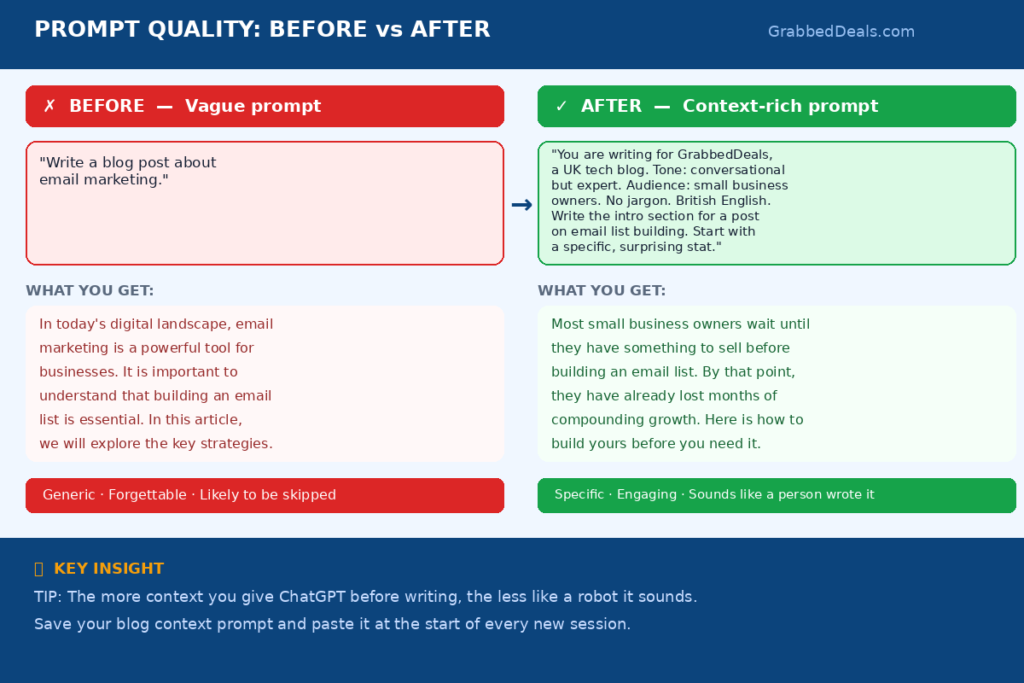
ChatGPT generates text by predicting the most likely next word based on everything it was trained on. When you give it a vague prompt like “write a blog post about email marketing,” it falls back on the most average, most common version of an email marketing article it has ever seen. It is not trying to be dull. It is being statistically typical.
The more specific and unusual your inputs, the less generic the output. A vague prompt produces average output. A detailed, opinionated, context-rich prompt produces something that actually sounds like a person wrote it.
The other problem is that most bloggers ask ChatGPT to do too much in one go. “Write me a 2,000-word blog post on keyword research” is almost always going to produce something flat. You get one structure, one voice, one interpretation of what you wanted, and it is rarely exactly right. The fix is not better AI. It is a smarter approach.
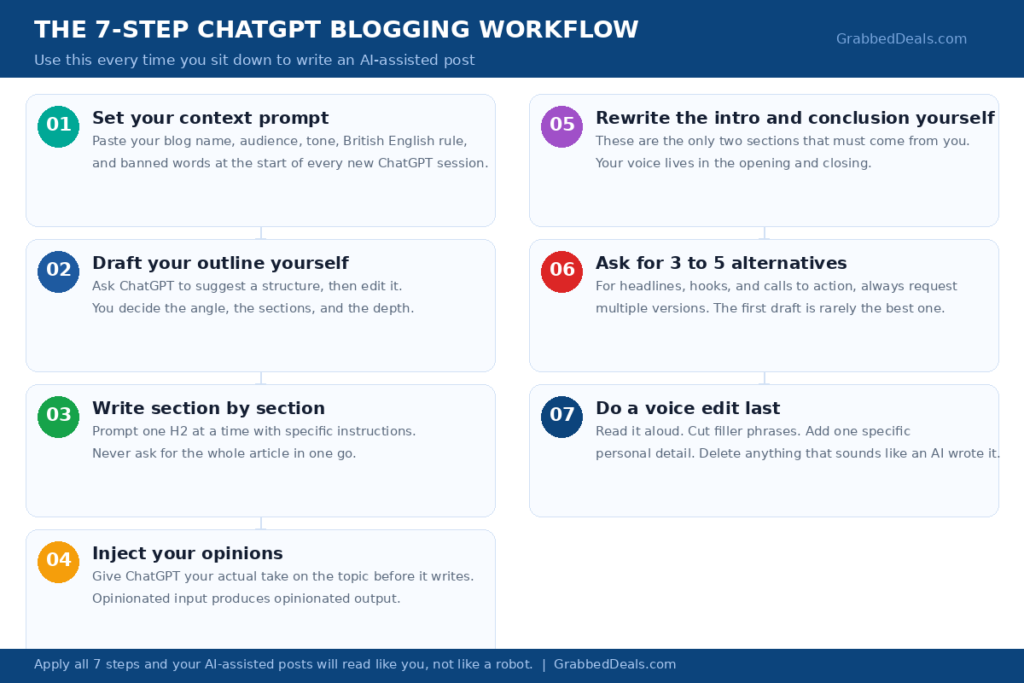
Here are the seven techniques.
1. Set the context before you write a single word
This is the single most impactful change you can make, and most bloggers skip it entirely.
Before you ask ChatGPT to write anything, give it a briefing. Tell it who you are, who your readers are, what tone you write in, and what makes your blog different. This takes about two minutes and transforms the quality of everything that follows.
A context prompt for a tech blog might look like this:
“You are helping me write for GrabbedDeals, a tech review blog aimed at UK and European readers who want honest, practical advice on AI tools, gadgets, and buying decisions. My writing tone is conversational but informed, like a knowledgeable friend who has already done the research. I write in British English. I never use buzzwords like ‘cutting-edge’ or ‘game-changing.’ I always write in second person. I call out weaknesses honestly. I use real numbers and examples wherever possible.”
That one briefing changes every output in the session. ChatGPT now has a character to write in, an audience to write for, and a list of things to avoid. You will notice the difference immediately.
If you use ChatGPT regularly, save your context prompt somewhere so you can paste it at the start of every new session. It takes ten seconds and it is worth every one of them.
2. Never ask it to write the whole article at once
“Write me a 2,500-word blog post about the best laptops for students in 2026.”
That prompt will produce a 2,500-word blog post. It will also be forgettable, over-structured, and probably factually thin in the sections that matter most. When you ask for everything at once, ChatGPT makes every decision for you: the angle, the structure, the depth of each section, what to include and what to leave out.
The better approach is to write section by section, making those decisions yourself.
Start with an outline. Ask ChatGPT to suggest a structure and you review it, add your own sections, cut what does not fit, and move things around until it reflects what you actually want to say. Then draft each section separately with specific instructions for each one.
“Write a 200-word introduction for this article. The hook should address the specific frustration of having too many options. Do not start with a definition of what a student is. Start with the problem.”
“Write the section on battery life. Focus on real-world battery performance, not just spec sheet numbers. Include the fact that manufacturers regularly overclaim battery figures and explain how to read them.”
This approach gives you control at every step. It also means you can stop, add your own perspective, paste in a stat you found, and continue. The final article is built from decisions you made, not defaults ChatGPT picked.
3. Give it your opinions, not just your topic
Here is what most bloggers do: they give ChatGPT a topic and ask it to write about it. Here is what the best AI-assisted bloggers do: they give ChatGPT a topic and their specific take on it.
ChatGPT does not have opinions. It has tendencies, and those tendencies are to be balanced, fair, and non-committal. That is the opposite of what makes a blog post engaging. Readers do not want “on the one hand, on the other hand.” They want someone who has made a decision and can defend it.
So before you prompt, spend one minute writing down your actual take on the topic. What do you think the reader should do? What surprised you? What is the conventional wisdom that you think is wrong? What would you tell a friend who asked you about this?
Feed that into your prompt.
“I am writing a post about the best budgeting apps for 2026. My honest take is that most people overthink this and the free version of YNAB does everything 90% of users actually need. The expensive paid tools mostly serve people who enjoy optimising rather than people who need help. Write the buying guide section with that perspective built in.”
Now you are giving ChatGPT a position to write from. The output will be more interesting, more decisive, and much closer to something you would actually publish. You will still edit it, but the bones will be stronger.
4. Use it to draft, then rewrite the opening yourself
The opening of a blog post is where your voice lives. It is also consistently the worst part of ChatGPT’s output.
AI-generated introductions tend to follow the same pattern: state the topic, acknowledge that it is important or confusing, promise to explain it, list what the article will cover. It is technically adequate and completely unremarkable. Nobody reads those openings and thinks “I need to read the rest of this.”
The fix is simple: let ChatGPT draft the body of your article, then delete its introduction entirely and write your own.
Your opening does not need to be long. Two or three sentences that hook the reader with something specific, unexpected, or immediately useful. A bold statement. A number that surprises. A question that makes the reader check whether they are doing something wrong. A short story that places them inside the problem.
ChatGPT is excellent for the structural heavy lifting in the middle of an article. It is not great at the kind of original, specific opening that makes someone decide to keep reading. That is the part you keep for yourself.
The same logic applies to conclusions. Write those yourself too. A conclusion that declares a clear winner, gives a direct recommendation, or ends on a thought that stays with the reader is something only you can produce, because it requires a real opinion.
5. Ask for alternatives, not just one version
This is one of the most underused techniques in ChatGPT prompting.
Instead of asking ChatGPT to write a headline, ask it to write five headlines in different styles. Instead of asking for an introduction, ask for three different ways to open the article. Instead of asking for a call to action, ask for four variations with different tones.
Why does this matter? Because the first version ChatGPT produces is the most obvious version. When you ask for multiple options, you force it to explore less predictable territory. Option three or four is often significantly better than option one.
This is also a useful technique when something feels slightly off but you cannot put your finger on why. Instead of trying to describe what you want differently, just ask for five more versions and see which one solves the problem.
“Give me 5 different ways to open the section on pricing. Try a different approach for each one: one starts with a question, one starts with a specific number, one starts with a counterintuitive statement, one starts with a common mistake, one starts with a direct recommendation.”
You almost never use all five. But the range of options gives you something to react to, which is often easier than describing exactly what you want from scratch.
6. Use it for the parts you hate, write the parts you love
Most bloggers have parts of the writing process they find genuinely tedious. Meta descriptions. FAQ sections. Alt text for images. Rephrasing something they have already said too many times. Generating five title variations to A/B test.
These are the ideal jobs for ChatGPT. They do not require your voice. They do not require original thinking. They just require decent text that meets a functional requirement. Let ChatGPT handle them entirely.
At the same time, there are parts of your blog that only you can write well. Your hands-on impressions of a product. Your actual experience using a tool for three weeks. The comparison you built yourself after testing both options. The specific situation where the “obvious” choice failed and you had to find an alternative.
Those sections should come from you. Use ChatGPT to edit and tighten them if you want, but do not ask it to generate them. Readers can tell the difference between “this person has used this thing” and “this person asked an AI to summarise what using this thing is like based on reviews.” The first one builds trust. The second one does not.
The most effective AI-assisted bloggers treat ChatGPT as a very capable production assistant and themselves as the journalist. The tool handles the scaffolding. You provide the substance.
7. Edit for your voice, not just for errors
Most bloggers edit AI content the same way they would edit their own writing: fix the grammar, check the facts, remove the clunky sentences. That is necessary, but it is not enough.
The final and most important step is a voice edit. Read the draft aloud and ask yourself: does this sound like me? Would I actually say this? Is this how I talk about things?
A few specific things to look for:
Filler phrases like “it is worth noting that,” “it is important to understand,” and “in the world of [topic]” are reliable signs of unedited AI copy. Delete them every time you see them.
Sentences that start with “This means that…” or “As a result…” are usually unnecessary transitions. Cut them and let the ideas speak for themselves.
Paragraphs that begin with the same word as the sentence before often indicate ChatGPT filling space rather than making a point. Merge them or cut one.
Most importantly, add things back in that ChatGPT cannot produce: a specific example from your own experience, a counterpoint you genuinely believe, a joke that only makes sense if you actually know the subject. One or two of these per article is the difference between content that ranks and gets ignored, and content that readers remember.
Your voice is not a stylistic luxury. It is the reason someone reads your blog instead of the thousand other pages that cover the same topic.
FAQ
Does Google penalise AI-generated blog content?
Google does not penalise content for being AI-generated. It penalises content that is unhelpful, thin, or unoriginal. AI-generated content that is well-edited, factually accurate, and genuinely useful to the reader can rank extremely well. The problem is that unedited AI content tends to be thin and unoriginal by default. Edit properly and this is not a concern.
Do I need ChatGPT Plus or will the free version work?
The free version is capable for most blogging tasks: outlines, section drafts, titles, meta descriptions, FAQ content, and rewrites. ChatGPT Plus is worth upgrading to if you need web browsing for current data, image generation, or access to GPT-4o’s stronger reasoning for more complex topics. For most bloggers starting out, free is fine.
How do I stop ChatGPT from using words I hate?
Include a list of banned words and phrases directly in your context prompt. For example: “Never use the words leverage, utilise, cutting-edge, game-changing, seamlessly, or robust. Do not open paragraphs with ‘In today’s world’ or ‘It is worth noting.’ Do not end articles with vague conclusions.” ChatGPT follows these instructions consistently within a session.
Can I use ChatGPT to write product reviews?
ChatGPT can draft the structure and write sections based on specifications, pros and cons lists, or user reviews you feed it. However, a genuine product review should include your hands-on experience with the product. Using ChatGPT to write a review of something you have not personally used will produce content that reads as generic and that readers and Google will recognise as thin. Use it to support your review writing, not replace it.
How long should I spend editing AI-generated drafts?
A useful rule of thumb: plan to spend roughly the same amount of time editing as a skilled editor would spend on human-written copy of the same length. For a 2,500-word article, that is 45 to 60 minutes of focused editing. If you are spending less than 20 minutes editing a full article, you are probably publishing something that sounds like it was written by an AI. If you are spending three hours editing, your prompts need work.
The bottom line
ChatGPT is a genuinely useful tool for bloggers. It is also one of the most misused tools in content creation, because people hand it too much control and then wonder why the output is flat.
The bloggers producing great AI-assisted content are not using better prompts in some secret way. They are doing exactly what this guide covers: setting context, working section by section, injecting real opinions, rewriting the parts that matter most, and editing with their own voice in mind.
Your readers do not know whether you used ChatGPT. They just know whether the article was worth reading. Make it worth reading and none of the rest matters.
If you want to take your AI writing setup further, the next step is learning how to combine ChatGPT with a proper SEO workflow. We cover exactly that in our guide to the best AI tools for blogging in 2026.
Explore our more pages – AI Tools & Productivity | Smartphone Ecosystems | Laptop & PCs | Audio & Sound Systems | Gaming | Photography & Videography | EV & Green Tech | Digital Marketing & SEO | Smart Home & Wearables | Tech Deals & Buying Guides |