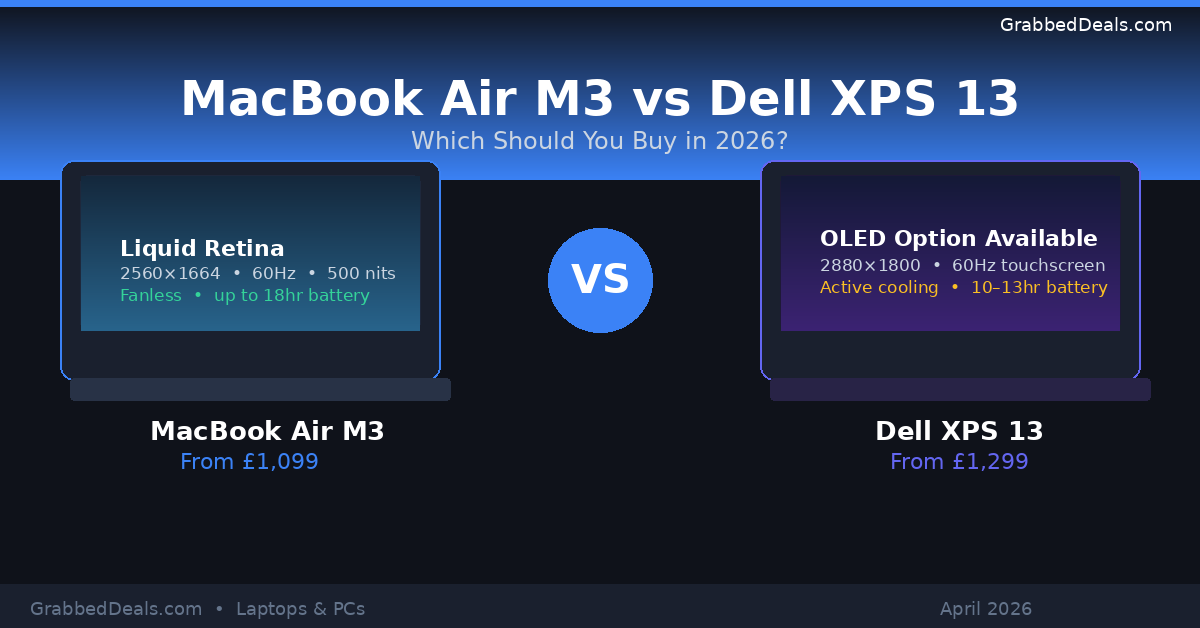
The MacBook Air M3 starts at £1,099 and delivers up to 18 hours of real-world battery life.
The Dell XPS 13 starts at £1,299 and offers a choice of Intel Core Ultra or Snapdragon X Elite processors.
The MacBook Air wins on battery life, fanless silent operation, and ecosystem integration.
The Dell XPS 13 wins on display flexibility (OLED option available), port options, and Windows versatility.
Bottom line: The MacBook Air M3 is the better all-round laptop for most people. The XPS 13 makes sense if you need Windows, want an OLED touchscreen, or require more RAM headroom.
Who is this for?
This comparison is for anyone choosing between two of the best thin-and-light laptops you can buy in 2026. Whether you’re a student, a remote worker, a creative professional, or someone who simply wants the best ultrabook for daily use, this head-to-head breaks down what actually matters so you can spend your money confidently.
The MacBook Air M3 is the better laptop for most people in 2026. It’s thinner, quieter, longer-lasting on a single charge, and more straightforward to buy. But the Dell XPS 13 is a genuine contender, and if your workflow is tied to Windows, or you want an OLED touchscreen that the MacBook simply doesn’t offer, it earns its place on the shortlist.
The decision comes down to one question more than anything else: are you already in the Apple ecosystem, or are you in the Microsoft one? Your answer settles most of this comparison before you’ve even looked at a spec sheet.
Choose the right laptop for your 2026 workflow by comparing the MacBook Air M3 and Dell XPS 13 specs and battery life.
Specs at a glance
Feature
MacBook Air M3 (13-inch)
Dell XPS 13 (Intel, 2024)
Starting price
£1,099
£1,299
Processor
Apple M3 (8-core CPU)
Intel Core Ultra 7 256V
RAM
8GB unified (base) / 16GB / 24GB
16GB (base) / 32GB
Storage
256GB SSD (base) / up to 2TB
512GB SSD (base) / up to 2TB
Display
13.6-inch Liquid Retina, 2560×1664, 60Hz
13.4-inch IPS FHD+, 1920×1200 (base)
Display options
Single IPS option
FHD+, QHD+, or OLED (2880×1800)
Battery life
Up to 18 hours
Up to 12 to 15 hours
Weight
1.24 kg
1.18 to 1.22 kg
Thickness
11.3 mm
14.8 to 15.3 mm
Ports
2x Thunderbolt 4, 3.5mm jack, MagSafe 3
2x Thunderbolt 4, 3.5mm jack
Fan
Fanless
Active cooling (fan)
Colours
Midnight, Starlight, Space Grey, Silver
Platinum, Graphite
Design and build quality
Both of these laptops are genuinely beautiful. That’s not faint praise. Most laptops in 2026 look decent at best, but the MacBook Air and the XPS 13 are the two machines people notice when you open them in a coffee shop.
The MacBook Air is thinner, measuring just 11.3 mm compared to the XPS 13’s 15.3 mm at its thickest point. The difference is subtle but noticeable when you slide both into a bag. It also comes in four colour options, giving you a choice the XPS 13 doesn’t offer. The MacBook Air is actually thinner than the XPS 13, and in testing, the keyboard felt great to type on with excellent key travel and responsiveness for such a thin device.
The Dell XPS 13 has its own appeal. The XPS 13 adopts a daring new aesthetic with a mesmerising hood and futuristic deck that is both minimalist and elegant. It’s marginally lighter than the MacBook Air at its base weight of 1.18 kg. The CNC-machined aluminium chassis on both machines feels premium and solid, with no flex or creaking.
One design issue worth flagging on the XPS 13 is the near-invisible touchpad. One notable downside is the “invisible” touchpad, which poses an accessibility issue for blind or partially-sighted users, as you can’t feel the difference between the palm rest and the actual touchpad.
The MacBook Air is also fanless, which means it runs completely silently under normal use. The XPS 13 has a fan, which you’ll hear during heavier tasks. Whether that matters depends entirely on how you work.
Winner: MacBook Air M3 (on thinness, colour choice, and silent fanless operation)
Display comparison
This is where the comparison gets genuinely interesting, because the two laptops take very different approaches.
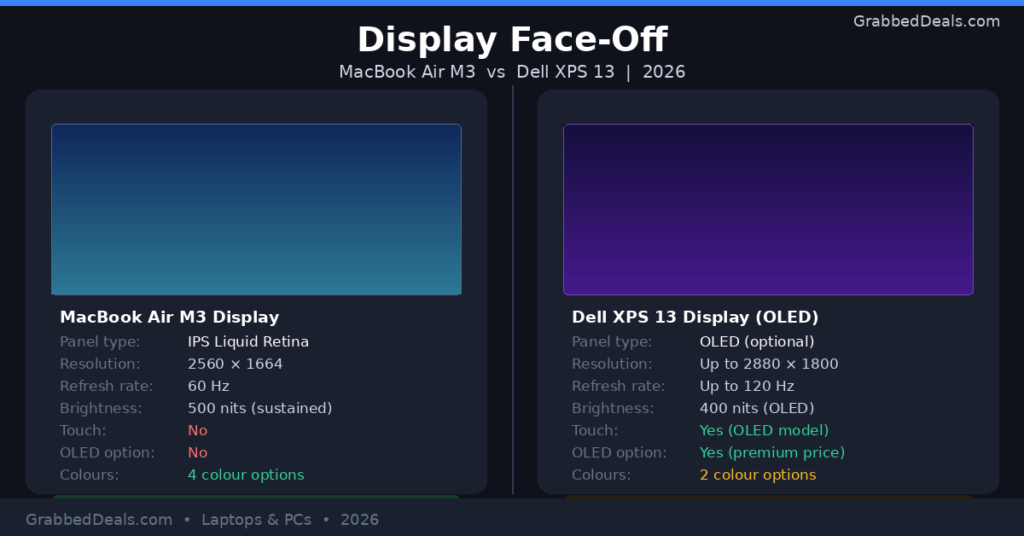
The MacBook Air gives you a single display option: a 13.6-inch Liquid Retina panel at 2560×1664 resolution with 500 nits of sustained brightness. The MacBook Air display features a 13.6-inch Liquid Retina panel with 2560×1664 resolution and 500 nits of sustained brightness. It’s sharp, accurate, and more than adequate for creative and professional work. The downside? No touchscreen, no OLED, and 60Hz refresh rate only.
The Dell XPS 13 offers more flexibility. The XPS 13 offers greater customisability, as you can get up to a 2.8K OLED touchscreen display. That OLED option pushes resolution to 2880×1800 with deeper blacks, wider colour range, and richer contrast than any IPS panel can produce. If you’re editing photos or video and you want the most visually impressive screen, the XPS 13 in OLED configuration wins this round.
The screen on the Dell XPS 13 is the real “wow factor” for this laptop. You get a top-spec 3K InfinityEdge OLED touch display which provides excellent picture quality and colour range.
That said, the OLED model comes at a significant price premium. The base XPS 13 with its standard FHD+ panel is noticeably less sharp than the MacBook Air’s display. If you’re not paying for the OLED upgrade, the MacBook Air wins the display round at comparable price points.
Winner: Dell XPS 13 (if you go for the OLED upgrade) | MacBook Air M3 (at base price points)
Compare the visual technology of your next laptop to see if you prefer the MacBook’s consistent brightness or the Dell’s 120Hz OLED touch experience.
Performance: M3 chip vs Intel Core Ultra
The MacBook Air M3 uses Apple’s own silicon, and it continues to embarrass Intel in real-world efficiency. Real-world benchmarks suggest that while both machines perform admirably under pressure, the M3 tends to be not only faster but also more consistent over time due largely to superior thermal management systems inherent within Apple’s silicon designs.
Because the MacBook Air is fanless, it can’t sustain peak performance indefinitely under heavy load. It throttles to avoid overheating. For most users doing writing, browsing, video calls, and even light video editing, this never becomes an issue. If you’re running long rendering jobs or sustained heavy computation, the XPS 13’s active cooling gives it an advantage in sustained output.
Thanks to its cooling system, the XPS performs better during long, intensive tasks. It maintains stable speeds, which is important for heavy workloads.
For GPU performance, the M3’s integrated graphics pull ahead. The Snapdragon X Elite scores above the M3 MacBook Air at multi-core performance, but can’t quite level up at single-core and GPU-heavy workloads. Running the 3DMark Wildlife Extreme test shows the Snapdragon silicon lagging behind by a healthy 36% after repeated runs.
The NPU (neural processing unit) story has evolved. Each laptop includes a Neural Processing Unit, with the XPS 13 models having faster NPU versions than Apple’s Neural Engine. For AI-accelerated tasks in Windows 11, that NPU lead matters. For macOS users, Apple’s on-device AI features use the full chip efficiently and the gap closes considerably in practice.
Winner: MacBook Air M3 (for most users and GPU tasks) | Dell XPS 13 (for sustained heavy workloads and NPU tasks)
Battery life
This is the MacBook Air’s most decisive advantage. The MacBook Air claims up to eighteen hours on web browsing alone. Independent tests corroborate these figures, showing anywhere between fourteen to sixteen hours depending on usage scenarios such as streaming media versus light productivity tasks.
The Dell XPS 13 has improved significantly over previous generations, and with the introduction of both Intel Lunar Lake and Snapdragon X Elite options for the XPS 13, battery life has improved significantly. Real-world testing puts it at around 10 to 13 hours on normal tasks. That’s a perfectly respectable result for a Windows ultrabook, but it’s still clearly behind the MacBook Air.
One advantage the XPS 13 holds: fast charging. You can get a meaningful charge in a short time, which matters if you’re working from a bag and need a quick top-up. The MacBook Air charges via MagSafe, freeing up your Thunderbolt ports, which is a practical advantage in daily use.
If you spend a lot of time away from a power socket, the MacBook Air’s battery life is genuinely transformative. Many users report going two full working days without reaching for a charger.
Winner: MacBook Air M3 (and it’s not close)
Keyboard, trackpad, and ports
The MacBook Air’s keyboard is widely considered one of the best on any laptop. Key travel is consistent, feedback is satisfying, and you can type fast on it without fatigue. The trackpad is enormous and uses Apple’s Force Touch technology for precise, responsive input.
The XPS 13 keyboard is good but slightly more polarising. The edge-to-edge layout with zero key spacing looks striking but takes some adjustment. The glass palm rest and hidden touchpad give it a seamless aesthetic that some users love and others find disorienting, particularly when trying to find the touchpad boundary without looking.
On ports, both laptops are quite minimal. The Dell XPS 13 offers only two Thunderbolt 4 USB-C ports. The MacBook Air does suffer from a similar issue regarding its lack of ports, with only two Thunderbolt 4 USB-C ports, a 3.5mm headphone jack, and MagSafe 3 for charging. However, the MacBook Air just barely wins this round because you don’t have to sacrifice a USB-C port for charging.
That MagSafe detail matters more than it sounds. On the XPS 13, charging takes up one of your two USB-C ports. If you need a display output and power at the same time, you need a dock. The MacBook Air keeps both ports free while plugged in.
Winner: MacBook Air M3 (trackpad, keyboard, and MagSafe advantage)
macOS vs Windows 11: the ecosystem question
Here’s the honest truth about this comparison: the operating system matters more than any individual spec.
If you’re already using an iPhone, iPad, AirPods, or iCloud, the MacBook Air slots into your life with very little friction. Handoff, AirDrop, Universal Clipboard, and iMessage on macOS create a genuinely useful ecosystem. If your world is built around these things, a Windows laptop creates friction that no performance benchmark can offset.
If your work depends on Windows-specific software, whether that’s Microsoft Teams with specific integrations, enterprise IT environments requiring Windows, specialist applications in fields like engineering, architecture, or finance, or simply a strong preference for the Windows interface, then the Dell XPS 13 is the right tool. macOS isn’t better or worse than Windows 11; it’s different, and ecosystem compatibility is a practical constraint rather than a preference.
The XPS 13’s active NPU also gives it an edge in Windows Copilot and other on-device AI features that are part of the Windows 11 roadmap.
Winner: Depends entirely on your existing ecosystem
Price and value
The MacBook Air starts at £999, which is more affordable than Dell’s asking price of £1,399. That said, the base MacBook Air comes with 8GB of RAM, which we’d recommend upgrading to 16GB at an additional cost. Apple is still shipping base MacBooks with 8GB, costing £200 to upgrade to 16GB, which we recommend doing, thereby levelling the playing field in terms of pricing and actually making the XPS 13 a lot cheaper for shoppers who want 16GB from the start.
Here’s how the pricing stacks up for a properly configured machine:
MacBook Air M3 with 16GB RAM, 512GB SSD: approx. £1,299 to £1,399
Dell XPS 13 with OLED display: approx. £1,600 to £1,800
At the mid-range configuration, these two laptops land at almost the same price. The XPS 13 offers a lower entry point for 16GB of RAM but becomes significantly more expensive if you want the OLED display upgrade that makes it visually competitive with the MacBook Air’s panel.
The MacBook Air also holds its resale value significantly better than Windows ultrabooks. If you sell or part-exchange a MacBook after two or three years, you’ll typically recover a far higher percentage of your original cost.
Winner: MacBook Air M3 (better value across the ownership lifecycle)
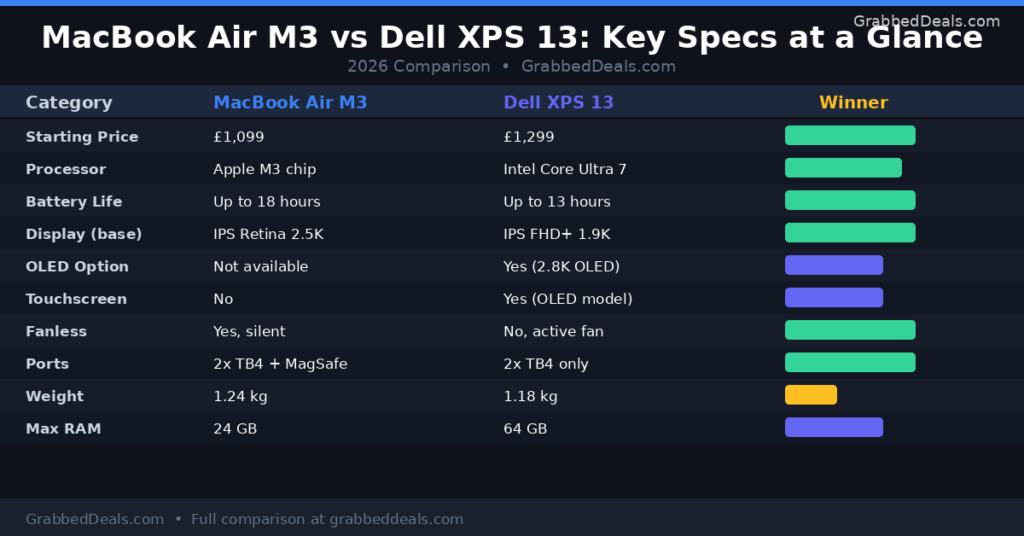
Compare the 2026 specifications of the MacBook Air M3 and Dell XPS 13 to see if you prefer silent fanless efficiency or high-capacity RAM and OLED touch versatility.
Who should buy the MacBook Air M3?
The MacBook Air M3 is the right choice if you:
Already use an iPhone, iPad, or other Apple devices and want seamless integration
Work in creative fields such as design, photography, or video editing where display accuracy and GPU performance matter
Prioritise battery life above all else and want to work freely without hunting for sockets
Need silent operation (for libraries, studios, open-plan offices)
Want a laptop that holds its value well over time
Prefer a simpler, more opinionated operating system with fewer configuration decisions
It’s also worth noting that if you’re considering the MacBook Air M3 specifically, it’s worth checking current pricing because the M4 MacBook Air has launched and may be available at comparable or lower prices depending on retailer offers at the time you’re reading this.
Who should buy the Dell XPS 13?
The Dell XPS 13 is the right choice if you:
Work in a Windows-dependent environment (enterprise IT, specific software tools, Windows-only applications)
Want a touchscreen laptop (the MacBook Air offers no touchscreen option)
Want OLED display quality and are willing to pay for the upgrade
Need more than 24GB of RAM (the XPS 13 goes to 64GB, the MacBook Air tops out at 24GB)
Prefer the flexibility of more operating system customisation
Are already invested in the Microsoft ecosystem (OneDrive, Teams, Office suite)
The XPS 13 is also slightly lighter in its base configuration, which matters if grams are genuinely important to you.
Final verdict
The MacBook Air M3 wins this comparison for most people. Its battery life advantage is decisive, its performance is excellent for everyday and creative workloads, and its fanless design means it runs silently no matter where you use it. The MagSafe charging, the trackpad, and the proven Apple ecosystem integration push it ahead of the XPS 13 on almost every daily-use metric.
The Dell XPS 13 is not a bad laptop. Far from it. But it makes the most sense in specific situations: when you need Windows, want an OLED touchscreen, or need more than 24GB of RAM. For general use, the MacBook Air M3 offers a more polished, longer-lasting, and more cohesive experience.
Our pick: MacBook Air M3 for most users | Dell XPS 13 for Windows-dependent workflows and OLED display seekers.
Frequently asked questions
Is the MacBook Air M3 faster than the Dell XPS 13? For most everyday tasks and GPU-heavy workloads, the MacBook Air M3 is faster and more consistent. Apple’s M3 chip delivers superior single-core performance and significantly better integrated graphics than Intel’s Core Ultra alternatives. The XPS 13 has the advantage in sustained heavy workloads because of its active cooling fan, but for daily use, the M3 is the quicker machine in real-world conditions.
Which laptop has better battery life in 2026? The MacBook Air M3 has considerably better battery life. Apple claims up to 18 hours, and independent testing consistently shows 14 to 16 hours of real-world use. The Dell XPS 13 delivers around 10 to 13 hours, which is solid for a Windows ultrabook but still meaningfully behind the MacBook.
Can you get the MacBook Air M3 with an OLED display? No. The MacBook Air M3 uses a Liquid Retina IPS panel across all configurations. There is no OLED or touchscreen option. If an OLED display is a priority for you, the Dell XPS 13 in its premium configuration is the better choice between these two laptops.
Is the Dell XPS 13 worth paying more for than the MacBook Air? At base configurations, the MacBook Air M3 is actually cheaper. If you configure both machines with 16GB of RAM and 512GB of storage, they land at roughly the same price. The XPS 13 only becomes significantly more expensive if you add the OLED display upgrade. Whether that premium is worth it depends on how important display quality is to your work.
Which laptop is better for students? The MacBook Air M3 is the better student laptop for most use cases. Its battery life means it lasts a full day of lectures without a charger, its fanless design suits library use, and it handles the creative and productivity tasks students need without compromise. Students already using iPhones will also benefit from the Apple ecosystem integration. Students whose university provides Microsoft software or requires Windows applications may find the XPS 13 a more practical fit.
Author bio: The GrabbedDeals team covers AI tools, smartphones, laptops, and tech deals for readers across the UK, US, and Europe. Our reviews are independent, hands-on, and updated regularly.