Key Takeaways
- Gamma AI builds a full presentation from a text prompt in under 60 seconds
- Four pricing tiers: Free, Plus ($8/mo), Pro ($15/mo), Ultra ($100/mo)
- The Gamma Agent (v3.0) refines your deck through natural language commands
- PowerPoint export quality is inconsistent, a genuine limitation for corporate users
- Best for founders, marketers, consultants, and educators; less ideal for heavily branded enterprise decks
- The free plan gives you 400 AI credits with no credit card required
Who is this for? Anyone who creates presentations regularly and wants to know if Gamma AI is worth switching to in 2026. Whether you are a freelancer pitching clients, a marketer running internal updates, or a student building coursework decks, this review tells you exactly what to expect.
What is Gamma AI?
Gamma AI is a browser-based presentation tool that uses artificial intelligence to turn text prompts, outlines, PDFs, and uploaded documents into polished decks in under a minute.
It launched in 2020 as a slide editor, but the real inflection point came in early 2023 when the team integrated ChatGPT into the product. Usage exploded almost overnight. Since then, Gamma has grown beyond presentations to cover documents, websites, and social content too.
In September 2025, Gamma released version 3.0, repositioning itself as a full visual storytelling platform. The tagline shifted to reflect this: instead of “AI slides,” Gamma now pitches itself as a general-purpose AI content creator. The tool calls its outputs “Gammas” rather than decks or slides.
By April 2026, Gamma holds a 4.3 out of 5 on the Microsoft Store. User feedback is consistently positive about speed and ease of use, though export quality and design repetition are recurring complaints.

How Gamma AI works
The process has three steps.
Step 1: Input. You give Gamma a starting point. This can be a text prompt, a pasted outline, an uploaded PDF, a Word document, a PowerPoint file, or even a URL. Gamma reads the content and structures it automatically.
Step 2: Generation. Gamma’s AI produces a complete, structured presentation with text, layouts, images, and design elements. For most standard deck types, this takes between 30 and 60 seconds. The output includes logical structure, relevant imagery, and a visual hierarchy that already looks clean without any manual formatting.
Step 3: Refinement. You edit the result using Gamma’s visual editor, or you talk to the Gamma Agent, the AI assistant introduced in version 3.0, and describe what you want changed in plain language.
You can also use the Import and Transform feature to upload an existing PowerPoint file and have Gamma convert it into its web-native format. This works in reverse too, with PowerPoint export available on paid plans.
Key features in 2026
Gamma Agent
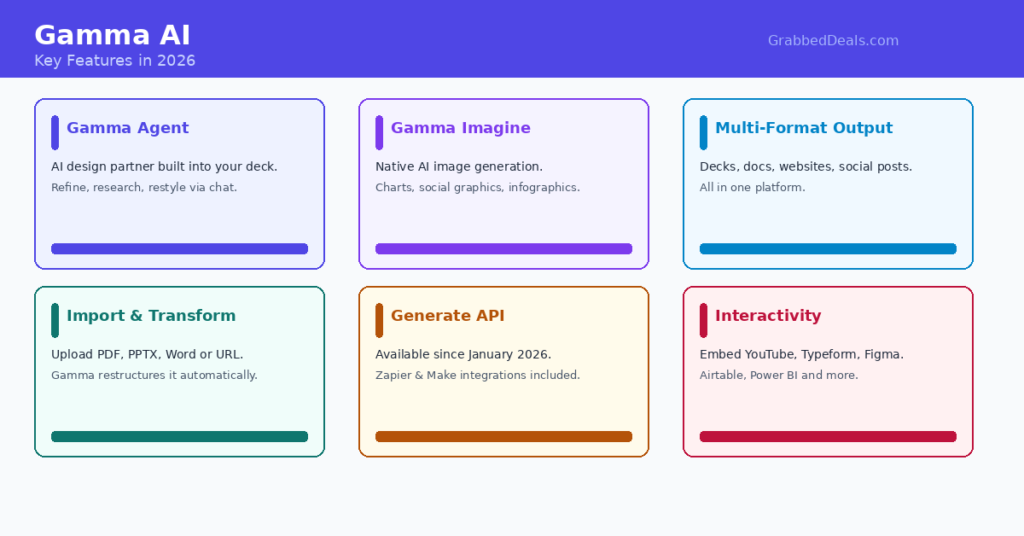
The Gamma Agent is the headline feature of the 3.0 update released in September 2025. It acts as an AI design partner inside your presentation. You can tell it to research a topic and add the findings, restyle the entire deck in a different tone, rewrite sections, or give design feedback, all through natural language conversation.
It genuinely changes how the tool feels. Instead of clicking through menus, you describe what you want and the Agent handles it. For users who do not want to learn a new interface, this is a significant time-saver. The Agent is available on Business, Enterprise, Education, and Nonprofit plans.
AI image generation with Gamma Imagine
Gamma launched its native AI image generation product in March 2026. Called Gamma Imagine, it lets you create brand-specific assets including interactive charts, visualisations, marketing collateral, social graphics, and infographics directly inside the platform. This puts Gamma in direct competition with Canva and Adobe for marketing teams who want to keep creative work in one tool.
Multi-format output
Gamma does not just produce slide decks. You can build web pages, documents, and social content inside the same environment. For teams that produce a variety of content formats, this means fewer tools to manage and a single interface to learn.
Import and Transform
Upload a PDF, PPTX, Word document, or paste a URL, and Gamma restructures the existing content into a polished visual presentation automatically. This is genuinely useful if you have existing reports or briefs that need to become presentations quickly.
Generate API
The Generate API became generally available in January 2026. It lets developers and power users create presentations programmatically at scale. Gamma also connects with Zapier and Make, giving access to integrations with over 8,000 third-party apps.
Embedding and interactivity
Gamma presentations support embedded videos from YouTube, Vimeo, and Loom, along with GIFs, live charts, forms from Typeform, Google Forms, and Calendly, and web apps. You can embed Figma designs, Miro boards, Airtable bases, and Power BI dashboards directly inside a deck.
Gamma AI pricing breakdown
Gamma uses a credit-based system on its lower tiers and moves to fair-use unlimited generation on paid plans. All prices are as of April 2026.
Free: $0 per month. 400 one-time AI credits, Gamma branding on all outputs, basic templates. Suitable for evaluation only. The watermark makes it unsuitable for professional presentations.
Plus: $8 per month (billed annually) or $10 per month (billed monthly). Unlimited AI creations under fair use, Gamma branding removed, advanced AI image models, custom brand colours and logo support. This is the right plan for most individual users.
Pro: $15 per month (billed annually) or $20 per month (billed monthly). All Plus features plus premium AI models, custom branding and fonts, analytics, API access, and up to 10 custom domains. Up to 50 cards per generated deck.
Ultra: $90 per month (billed annually) or $100 per month (billed monthly). The most advanced AI models, up to 75 cards per prompt, Studio Mode for cinematic full-image slides, 100 custom domains, and early access to new features. This tier is aimed at power users creating high volumes of content.
For teams, the Team plan runs at $20 per seat per month (minimum 2 seats) and adds a shared company theme, shared folders, admin controls, and centralised billing. The Business plan at $40 per seat per month (minimum 10 seats) is built for organisations that need enterprise-grade controls.
One important note on the free plan: the 400 credits are one-time and do not refresh monthly. On paid plans, credits refresh each billing cycle.
What Gamma does well
Speed that actually delivers
The 30 to 60 second generation time is not marketing copy. You genuinely get a structured, visually coherent first draft faster than you could open a blank PowerPoint file and choose a template. For anyone who creates presentations regularly, this time saving compounds quickly across the working week.
Web-native sharing
Gamma presentations live on the web. You share a link, not a file attachment. The recipient views the presentation in a browser where all of Gamma’s interactive elements, embedded media, and animations work as intended. No software required, no version compatibility issues, no file size constraints on email.
Low barrier to entry
The free plan gives you enough credits to create several complete presentations without entering a credit card number. This is an unusually generous trial compared to most AI tools in this category. Starting costs you nothing.
Quality of the first draft
For standard deck types, including company overviews, project updates, pitch decks, and educational content, the first draft from Gamma requires less cleanup than most comparable AI tools. The AI understands structure and applies visual hierarchy automatically. You spend time refining content, not battling formatting.
Where Gamma falls short
PowerPoint export quality
This is the most commonly cited problem with Gamma, and it is legitimate. When you export a Gamma to PowerPoint format, the formatting frequently breaks. Spacing shifts, fonts change, and the card-based layout does not always translate cleanly into traditional slides. Gamma holds a 2.0 out of 5 on Trustpilot, with export issues and repetitive designs cited most frequently.
If your workflow ends with a PowerPoint file sent as an attachment, or if your company requires PPTX delivery, Gamma will add friction rather than remove it.
Brand control requires a paid plan
Brand-level customisation, including custom fonts, enforced themes, and logo management, is locked behind paid tiers. On the free plan and even the Plus plan, your ability to enforce consistent branding is limited. Enterprise teams that need strict brand governance will find Gamma’s controls insufficient at lower tiers.
AI content can feel generic
Multiple user reviews on G2 and Capterra note that AI-generated content sometimes feels repetitive or generic, particularly for topics the model encounters frequently. You will typically need to rewrite or refine sections, especially for anything requiring specific expertise or a distinctive voice.
Privacy and content rights
Free and Plus users grant Gamma a licence to use their content for AI training. This is a practical concern if you are building presentations containing commercially sensitive information or proprietary strategy. Team and Business workspace plans automatically exclude content from AI training usage, which makes them more appropriate for confidential work. GDPR compliance for European audiences is also worth reviewing, as Gamma collects viewer data through shared presentations.
No offline mode
Gamma is entirely browser-based. There is no offline mode. If your internet connection is unreliable, or if you are presenting in a venue without stable internet access, Gamma’s web-native format becomes a liability rather than an asset.
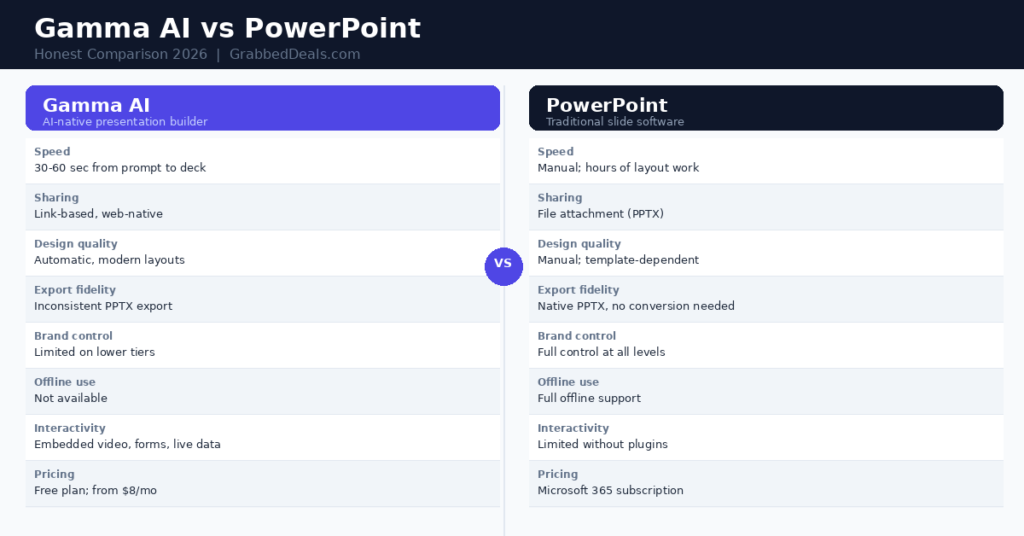
Gamma AI vs PowerPoint: honest comparison
This is the question the article title asks, so here is a direct answer.
Gamma wins on: Speed of creation, link-based sharing, interactivity, modern visual output, low cost of entry, and reducing the design workload for non-designers.
PowerPoint wins on: Export reliability, brand control, offline availability, data-heavy presentations, complex custom animations, and enterprise compliance requirements.
The right answer depends on what you are building and how you share it. For async presentations, internal updates, client proposals shared as links, pitch decks for early-stage conversations, and educational content, Gamma is a genuine improvement over PowerPoint. You will save real time and produce better-looking output with less effort.
For boardroom presentations, investor decks requiring consistent branding, client deliverables sent as PPTX files, or anything where your company has a strict template, PowerPoint is still the more reliable choice in 2026.
You do not have to choose one permanently. Many professionals use Gamma to build the first draft quickly, then export to PowerPoint for final polish and brand alignment. That hybrid workflow gets the best of both tools, even if the export sometimes requires correction.
For a broader look at how Gamma compares across the AI presentation category, G2’s AI presentation tools section aggregates verified user reviews from real professionals. TechCrunch’s coverage of Gamma Imagine puts the March 2026 product update in useful context. And if you want to understand how Gamma fits into the wider shift away from traditional slides, Harvard Business Review’s guidance on modern presentations remains the benchmark for what actually makes a presentation effective.
Who should use Gamma AI?
Use Gamma if you are:
- A founder creating pitch decks or investor updates regularly
- A marketer building client proposals, campaign reports, or internal briefings
- A consultant who needs polished decks fast and primarily shares by link
- An educator or trainer producing course materials and async content
- A freelancer who needs professional-looking output without a design budget
- A student who wants structured, well-presented work without spending hours on formatting
Consider alternatives if you are:
- Working inside a large organisation with strict brand governance requirements
- Required to deliver all presentations as PowerPoint files
- Handling commercially sensitive or personally identifiable data regularly
- Presenting in environments without reliable internet access
FAQ
Is Gamma AI free to use? Gamma has a genuine free plan that gives you 400 AI credits with no credit card required. This is enough to create several complete presentations and share them. The limitation is that the free plan adds Gamma branding to all outputs, which makes it unsuitable for external professional use. For client-facing or employer-facing presentations, the Plus plan at $8 per month is the right starting point. The watermark removal alone is worth the cost.
Can Gamma AI export to PowerPoint? Yes, Gamma can export to PowerPoint format on paid plans. However, export quality is one of its well-documented weaknesses. The formatting often shifts when Gamma’s card-based format converts to traditional slides. Fonts change, spacing breaks, and the visual layout can look quite different from the original. If clean PPTX output is essential for your workflow, plan time for post-export corrections, or consider using Microsoft Copilot inside PowerPoint instead.
How does Gamma AI compare to Google Slides? Gamma and Google Slides serve different workflows. Google Slides is a traditional slide editor that gives you full manual control and works natively inside Google Workspace, with strong real-time collaboration. Gamma generates presentations from prompts and is designed for speed and link-based sharing. Gamma produces better-looking output faster for most content types. Google Slides gives you more precise control and tighter integration for teams already working inside Google’s ecosystem.
What is the Gamma Agent and how does it work? The Gamma Agent is an AI assistant built into your presentation, introduced in Gamma 3.0 in September 2025. You interact with it through natural language conversation inside the editor. You can ask it to research a topic and pull in current information with citations, restyle the entire deck, rewrite individual sections, or provide design feedback. It is available on Business, Enterprise, Education, and Nonprofit plans. For individual users, the Pro plan gives access to the Agent’s full capabilities.
Is Gamma AI safe to use for confidential work? This depends on your plan. Free and Plus users grant Gamma a licence to use their content for AI training purposes. If your presentations contain commercially sensitive strategy, client data, or personally identifiable information, those tiers are not appropriate. Team and Business workspace plans automatically exclude content from AI improvement usage, which makes them the right choice for confidential material. For organisations with formal IT vendor review processes, Gamma’s SOC 2 documentation is available on request for Business plan subscribers only.
Verdict
Gamma AI is one of the strongest AI presentation tools available in 2026. For a specific type of user and workflow, it is excellent. For others, it creates more problems than it solves.
The case for Gamma is clear: you go from idea to polished, shareable deck in under a minute. The Gamma Agent makes editing feel like talking to a capable design assistant. The Plus plan at $8 per month is genuinely good value. The free plan lets you test all of this without a credit card.
The case against is equally clear: PowerPoint export is unreliable, brand control at lower tiers is limited, and free users give up content rights. If your professional workflow depends on handing over a PPTX file that looks exactly like your company template, Gamma is not ready to replace what you have.
Our recommendation: If you create presentations that you share as links, if you want to produce polished decks quickly without design skills, and if you are not locked into a corporate PowerPoint system, start with the free plan today. Create two or three real presentations you actually need. The quality of those first drafts will tell you everything. If they work, the Plus plan at $8 per month pays for itself in hours saved within the first week.
Try Gamma AI free, no credit card required
Related Posts
- Best AI Tools for Productivity in 2026: The Complete Guide
- ChatGPT vs Claude vs Gemini: Which AI Chatbot Wins in 2026?
- Notion AI Review 2026: Is It Worth Adding to Your Workflow?
Explore our more pages – AI Tools & Productivity | Smartphone Ecosystems | Laptop & PCs | Audio & Sound Systems | Gaming | Photography & Videography | EV & Green Tech | Digital Marketing & SEO | Smart Home & Wearables | Tech Deals & Buying Guides |
Author bio: The GrabbedDeals editorial team tests AI tools, tech products, and software so you don’t have to. Every review and comparison on this site is written after hands-on testing with real tasks.