Key Takeaways
- Midjourney v7 became the default model on 17 June 2025 and remains the standard for cinematic and artistic AI image quality in 2026.
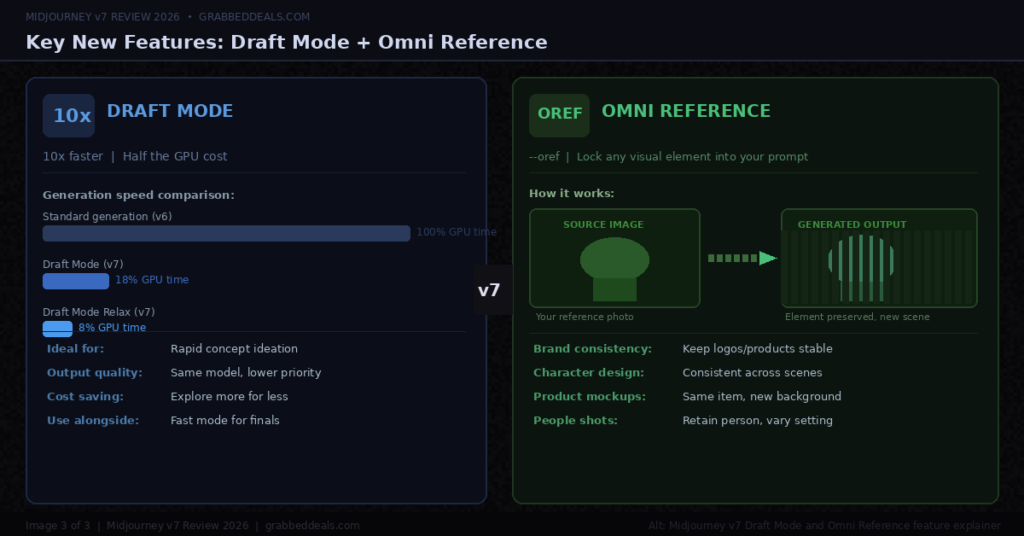
- The biggest v7 improvements are Draft Mode (10x faster at half the cost), Omni Reference (lock in any visual element from a reference image), and dramatically better prompt adherence.
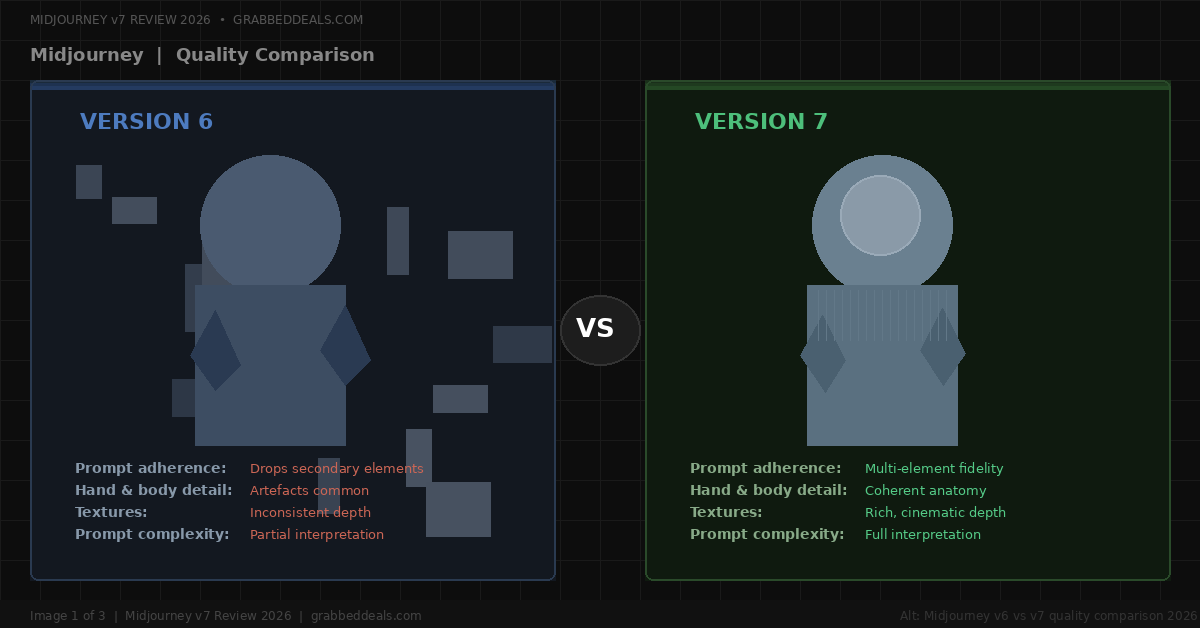
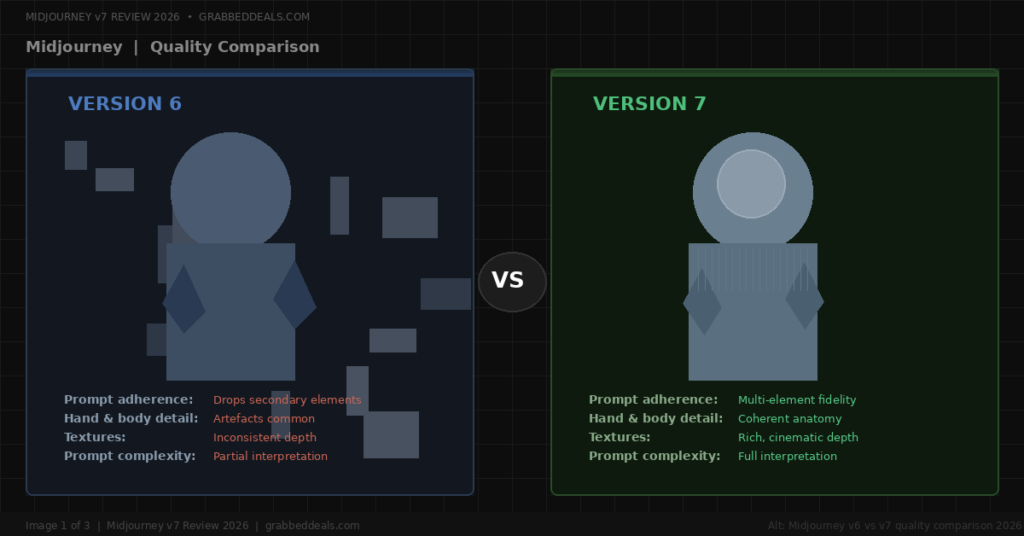
- Hands, bodies, and fine textures are visibly more coherent than in v6. Photography-style outputs now pass for editorial photographs.
- There is no free tier. Plans start at $10 per month for the Basic plan.
- Text rendering inside images is still a weakness. If you need accurate in-image text, DALL-E or Ideogram serve that need better.
- The Standard plan at $30 per month, with unlimited Relax mode, is the right choice for most creators.
- A v8 Alpha launched in March 2026 and a v8.1 Alpha arrived on 14 April 2026, but v7 remains the production standard for everyday use.
Who is this for?
This review is for designers, content creators, marketers, and photographers who want to know whether Midjourney v7 is worth paying for in 2026 and how it fits into a real creative workflow. If you are comparing it to free alternatives or trying to decide between plans, this guide gives you a direct answer.
What is Midjourney v7?
Midjourney v7 is the current flagship model from Midjourney, Inc., the independent AI research lab founded by David Holz. It was released in alpha on 3 April 2025 and became the default model on 17 June 2025. As of 2026, it’s the model you use when you open Midjourney, unless you manually switch to the v8 Alpha.
The platform has come a long way from its Discord-only roots. Midjourney now operates primarily through a web interface at midjourney.com, though the Discord bot remains available. The web portal includes a Canvas mode where you can drag, drop, and outpaint images spatially, making it far more practical than the old command-line style workflow.
What sets Midjourney apart from every other AI image generator is its aesthetic quality. The outputs have a cinematic, painterly character that competitors consistently fall short of replicating. V7 pushes that quality further, while also addressing the practical workflow frustrations that held v6 back.
This is not a toy. Midjourney v7 has evolved into a serious design tool used by concept artists, social media teams, marketing agencies, and independent creators who need high-quality imagery at speed.
What changed from v6 to v7?
The jump from v6 to v7 is more than an incremental update. Midjourney rebuilt the architecture from the ground up. Here is what that means in practice.
Prompt adherence improved significantly. Earlier versions would drop secondary subjects or interpret instructions in unexpected ways. V7 follows complex, multi-element prompts with much greater fidelity. If you describe a scene with three specific elements, all three appear where you placed them.
Draft Mode is the most useful new feature. It generates images roughly 10 times faster at half the GPU cost. This is not a lower-quality mode. It is designed for rapid ideation, letting you cycle through dozens of concepts before committing to full-quality generation. For anyone who used to burn through Fast hours in a single session, Draft Mode changes the economics of using Midjourney daily.
Omni Reference solves one of the biggest frustrations in AI image work. With the --oref parameter, you can lock in a specific visual element from a reference image, whether that is a person, a product, a vehicle, or a creature, and embed it accurately into your generated output. Brand consistency work and character design iteration are now genuinely practical.
Personalisation profiles are enabled by default in v7. The model learns your aesthetic preferences over time. You set it up in about five minutes by voting on images, and it creates a custom code that pulls your preferred style into every generation. For regular users, this adds compounding value over time.
Bodies, hands, and fine details are noticeably better. This was v6’s most widely criticised weakness. V7 handles anatomical coherence significantly better. The improvement is visible immediately on any portrait or full-body prompt.
Image quality: what v7 actually produces
Midjourney v7 produces some of the most photorealistic AI images available in 2026. Photography-style prompts generate outputs with realistic depth-of-field, convincing skin texture, and cinematic lighting that looks like it came from a high-end editorial shoot.
One comparison that circulates widely among professional users involves identical portrait prompts run through v6 and v7. The v6 output looks polished but artificial. The v7 output has the kind of detail and lighting you’d expect from a camera body costing several thousand pounds.
The aesthetic quality advantage over competitors is clearest at full resolution. Midjourney outputs have a compositional intelligence that most tools lack. The colour grading, the placement of subjects, the relationship between foreground and background all feel considered rather than generated.
For stylised work, the quality lead is even wider. Watercolour, oil painting, cyberpunk environments, surrealist scenes: v7 handles all of these with a consistency and depth that Adobe Firefly and DALL-E have not matched.
Key features in 2026
Draft Mode: 10x faster generation at half the GPU cost. Designed for ideation and rapid concept exploration. Available on all paid plans.
Omni Reference (--oref): Embed any visual element from a reference image into your generated output. Works for people, products, objects, and animals. Essential for brand consistency and character design.
Personalisation profiles: The model learns your visual preferences over time. Set up in five minutes by rating images. Creates a personal style code you can apply to any prompt.
Parameter control: Midjourney’s parameter system gives you granular creative control. Key flags include --stylize (artistic interpretation intensity), --chaos (variation randomness), --ar (aspect ratio up to 4:1), --weird (unconventional outputs), --no (negative prompts), and --seed (reproducibility). Mastering these parameters separates average outputs from exceptional ones.
Web interface and Canvas mode: The web portal replaced Discord as the primary creative hub for most users. Canvas mode lets you layer, outpaint, and edit images spatially. Real-time subject separation is built in.
Niji v7: The Niji model within v7 handles anime, illustration, and high-end graphic design styles. Released in January 2026, it is a distinct model from the main v7 and produces significantly different output for illustration-heavy workflows.
Vary Region and outpainting: Edit specific parts of a generated image or extend it beyond the original frame. These tools reduce the need for external software to refine outputs, though the editing capability remains more limited than Adobe Firefly’s Photoshop integration.
V8 Alpha (preview only): A v8 Alpha launched on 17 March 2026 and is accessible at alpha.midjourney.com. It is roughly five times faster than v7 and introduces native 2K resolution via the --hd parameter. A v8.1 Alpha launched on 14 April 2026. Neither version is available on the main Midjourney site or Discord yet. V7 remains the production standard.
Pricing breakdown for 2026
Midjourney operates on a subscription model with no permanent free tier. The free trial that existed in earlier years has not been consistently available since 2023.
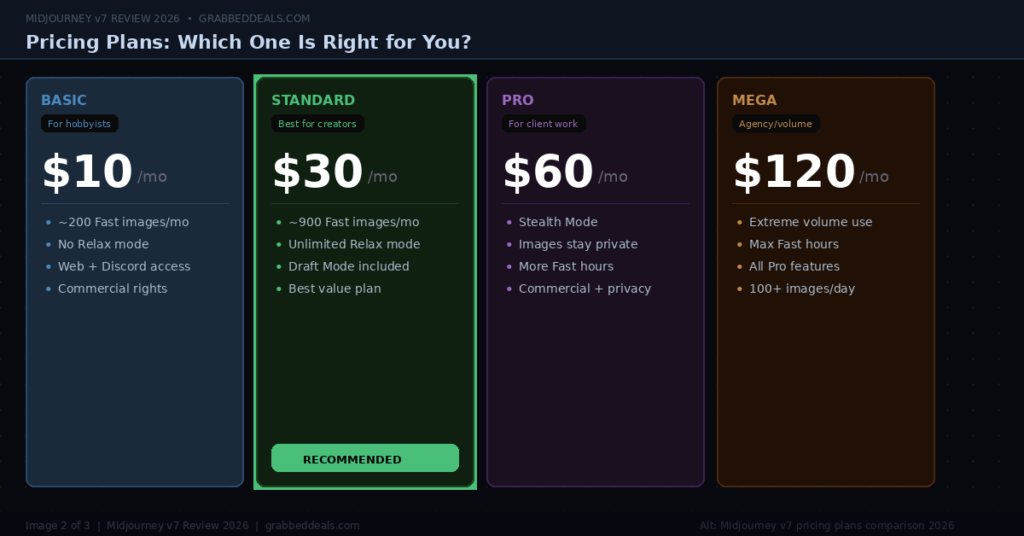
Basic plan: $10 per month Approximately 200 Fast Mode images per month. Around 3.3 GPU hours of fast generation time. No Relax mode. Suitable for casual users generating under 10 images per week. For any business use, you will exhaust this allowance quickly.
Standard plan: $30 per month The recommended plan for most creators. Around 900 fast-mode images plus unlimited Relax mode generations. Relax mode is slower but during off-peak hours (nights and weekends) it runs in 60 to 90 seconds. In practice, generating 60% of images in Relax mode makes the Standard plan offer excellent value. This is the right choice for social media managers, bloggers, and independent creators.
Pro plan: $60 per month Adds Stealth Mode, which keeps your generated images out of Midjourney’s public gallery. Essential for client work, brand assets, and unreleased campaigns. Without Stealth, every image you generate is publicly visible. If you do any commercial work for clients, Pro is the minimum tier you should consider.
Mega plan: $120 per month High-volume tier for agencies and individuals running AI art businesses at scale. Most creators and teams do not need this.
All plans include the same image quality. You are paying for generation speed and volume, not for access to better models.
Commercial use is included for all paid plans, subject to one important exception: companies earning over $1,000,000 USD annually must subscribe to the Pro or Mega plan for commercial rights. Always verify the current terms of service at docs.midjourney.com before using generated assets in commercial projects.
A 20% discount applies to annual billing across all plans.
Where Midjourney v7 falls short
No honest review skips the weaknesses. Midjourney v7 has several, and some of them are significant depending on your use case.
Text rendering inside images is still unreliable. This is the most widely criticised limitation. If your prompt requires readable text embedded in the image, such as a poster, a title card, or a logo, Midjourney frequently distorts or misspells it. V7 improved on v6 but has not solved the problem. For text-in-image work, DALL-E or Ideogram are better options.
No free tier. If you want to test Midjourney before committing, the only current path is a paid subscription. Competitors including Adobe Firefly (25 free monthly credits) and Leonardo AI (150 free daily tokens) offer free access. This is a genuine barrier for casual exploration.
Customer support is weak. Multiple users have reported Midjourney relying on community volunteers rather than dedicated support staff. Billing issues, including cancelled plans that still resulted in charges, are a recurring complaint. Content deletion without notification has also been reported. If you rely on the platform professionally, this is a real risk.
Character consistency at scale is limited. V7 introduced --cref for character reference, and you can reliably achieve three to five consistent shots of a character before drift sets in. For concept art this is workable. For comic production or longer narrative image sets, the consistency breaks down. This is an acknowledged limitation, not a bug.
Limited native editing compared to Adobe Firefly. Beyond Vary Region and Pan/Zoom outpainting, Midjourney does not offer layer-based editing. Adobe Firefly’s Generative Fill and integration with Photoshop and Illustrator make it significantly more powerful for production design workflows that require precise editing.
Content restrictions on lower-tier plans. The platform enforces strict content policies. Without Stealth Mode (Pro plan and above), there are additional limits on what the moderation system flags. For professional creative work that pushes stylistic boundaries, this occasionally causes frustration.
Midjourney v7 vs the competition
Midjourney v7 vs DALL-E (GPT Image 1) DALL-E’s brand has been retired at the API level and is now embedded directly inside ChatGPT as GPT Image 1. For accessibility and text rendering in images, DALL-E wins clearly. Its approximately 95% text rendering accuracy is decisive if accurate typography is part of your workflow. Midjourney wins on artistic quality, aesthetic output, and cinematic imagery. For most creative work judged on visual impact, Midjourney produces the better image. DALL-E is the better choice if you already pay for ChatGPT Plus and want image generation bundled into your existing workflow.
Midjourney v7 vs Adobe Firefly Adobe Firefly is the right choice if you work inside the Adobe Creative Cloud ecosystem and need commercial indemnification. Firefly is trained exclusively on licensed Adobe Stock content, and Adobe provides legal indemnification for commercial use. For enterprise legal teams, this matters significantly. Midjourney produces higher aesthetic quality, particularly for stylised and cinematic work, but faces ongoing copyright litigation that Firefly avoids entirely. A common professional workflow combines both: Midjourney for concept exploration and mood boarding, Firefly for finalising assets in Photoshop for commercial delivery.
Midjourney v7 vs Stable Diffusion Stable Diffusion is open source and free to run locally if you have compatible GPU hardware. It offers total customisation and data sovereignty that no other tool matches. For organisations with technical resources and a need for local deployment, it remains the only realistic option. For everyone else, the technical overhead and the quality gap on aesthetic output make Midjourney the better practical choice.
Midjourney v7 vs Ideogram Ideogram achieves approximately 90% text-rendering accuracy and handles typography better than any mainstream competitor. If your primary need is text-in-image generation, Ideogram deserves serious consideration. It is not as strong as Midjourney on artistic and cinematic image quality, but for poster designs, title cards, and branded graphics requiring readable text, it fills the gap Midjourney leaves.
Who should subscribe in 2026?
Subscribe to Midjourney v7 if you are a designer, illustrator, photographer, or marketer who needs the highest quality artistic imagery available from an AI. If your work is judged on visual impact, Midjourney produces results no competitor consistently matches.
Start with the Standard plan ($30 per month) if you generate images regularly for content, social media, or client projects. Unlimited Relax mode makes it excellent value for high-volume use.
Upgrade to Pro ($60 per month) the moment you are creating images for clients or campaigns that are not yet public. Stealth Mode is not optional at that point.
Look elsewhere if you need accurate text in images (use DALL-E or Ideogram), need free access to explore before committing (use Adobe Firefly or Leonardo AI), or require deep editing capabilities inside an existing design tool (use Adobe Firefly with Creative Cloud).
Verdict
Midjourney v7 is the best AI image generator available for creative and cinematic output in 2026. That verdict has not changed since v7 became the default in June 2025, and the competitors have not closed the aesthetic gap in a way that changes the recommendation.
Draft Mode makes daily use significantly more affordable. Omni Reference solves the brand consistency problem that frustrated professional users in v6. The web interface is genuinely usable. The image quality at full resolution is in a different category from every free alternative.
The weaknesses are real. Text rendering inside images is still unreliable, the customer support is poor, there is no free tier, and the character consistency limits matter if your workflow requires long narrative image sets.
But for designers, content creators, and visual marketers who need the best-quality AI imagery available, Midjourney v7 is worth the subscription. The Standard plan at $30 per month gives you everything you need for a professional creative output volume.
Try Midjourney v7 at midjourney.com
FAQ
Is Midjourney v7 free to use in 2026? No. Midjourney removed its permanent free trial in 2023 and has not brought it back. Paid plans start at $10 per month for the Basic plan. If you want to explore AI image generation for free, Adobe Firefly offers 25 generative credits per month, and Leonardo AI offers 150 free tokens daily. For the highest artistic quality, Midjourney remains the standard, but it requires a paid subscription from day one.
What is the difference between Midjourney v7 and v8? Midjourney v7 is the current production model, set as the default on 17 June 2025. V8 Alpha launched on 17 March 2026 and v8.1 Alpha arrived on 14 April 2026. Both v8 versions are preview releases accessible only at alpha.midjourney.com. They are not available on the main site or in Discord. V8 Alpha is roughly five times faster than v7 and introduces native 2K resolution, but it is not yet stable for production use. V7 remains the right choice for everyday creative work in 2026.
Which Midjourney plan should I get? The Standard plan at $30 per month is the right choice for most creators and small teams. It gives you around 900 fast-mode images plus unlimited Relax mode generations, which offers excellent value for daily content creation. If you produce images for clients or campaigns that are not yet public, upgrade to Pro at $60 per month for Stealth Mode, which keeps your generations out of the public gallery. The Basic plan at $10 per month is only practical if you generate fewer than 10 images per week.
Is Midjourney v7 better than DALL-E in 2026? It depends on your use case. Midjourney v7 produces superior artistic and cinematic imagery for most creative work. If visual impact is your primary criterion, Midjourney wins clearly. DALL-E (now GPT Image 1, embedded in ChatGPT) is significantly better at text rendering inside images, with approximately 95% accuracy compared to Midjourney’s unreliable text output. DALL-E is also more accessible if you already pay for ChatGPT Plus. For purely artistic work, choose Midjourney. For text-in-image work or when accessibility is a priority, DALL-E is the stronger option.
Can I use Midjourney v7 images for commercial purposes? Yes, all paid Midjourney plans include commercial use rights for standard subscribers. The exception applies to companies earning over $1,000,000 USD annually, who must subscribe to the Pro or Mega plan for commercial rights. Note that Midjourney’s training data has faced copyright litigation, which differs from Adobe Firefly’s approach of training exclusively on licensed content with commercial indemnification. For enterprise legal teams that need full copyright safety, Adobe Firefly is the more defensible option. Always verify the current terms at docs.midjourney.com before using generated assets commercially.
Related Posts
- Perplexity AI Review 2026: Is It the Best AI Search Engine?
- Jasper AI Review 2026: Is It Worth the Price for Content Creators?
- Best AI Tools for Designers in 2026: Honest Picks for Every Budget
External Links:
- Midjourney official documentation and version history — anchor: Midjourney v7 official documentation
- Midjourney pricing plans at midjourney.com — anchor: Midjourney subscription plans 2026
- Adobe Firefly pricing and plans for comparison — anchor: Adobe Firefly free tier and pricing
About the author: The GrabbedDeals editorial team reviews, tests, and tracks tech deals to help readers make smarter buying decisions. We cover AI tools, smartphones, laptops, audio, gaming, and more.
Explore our more pages – AI Tools & Productivity | Smartphone Ecosystems | Laptop & PCs | Audio & Sound Systems | Gaming | Photography & Videography | EV & Green Tech | Digital Marketing & SEO | Smart Home & Wearables | Tech Deals & Buying Guides |