Key takeaways
Perplexity AI is the strongest free research tool for verified students, with a 50% discounted Education Pro plan at around $9 to $10 per month. Claude is the best option for handling long documents, dense PDFs, and research-heavy academic writing. Google NotebookLM is completely free and turns your uploaded notes, PDFs, and slides into a personal AI tutor. ChatGPT remains the most versatile all-rounder, covering writing, coding, maths, and concept explanation. Grammarly and QuillBot round out the toolkit for polishing written work before submission. You do not need to pay for all of these. Two or three free tools, used strategically, cover most student needs.
Who is this for?
This guide is for school, college, and university students who want to use AI tools to study more effectively in 2026 without wasting money on subscriptions they do not need. Whether you are writing essays, doing research, revising for exams, or managing a heavy reading list, the tools below cover every stage of academic work. Most of them are free to start.
The honest state of AI tools for students in 2026
The advice you will find in most articles about AI tools for students is already outdated. Tool prices change, free tiers get cut, and what worked in 2024 is not necessarily what is best now.
Here is what is actually happening in 2026. The competition between AI companies for student users is fierce, which means free tiers have genuinely improved. Google is offering extended free access to Gemini for verified students. Perplexity has a dedicated Education Pro plan at 50% off its standard price. NotebookLM is completely free. This is the best time ever to be a student who uses AI, but only if you know which tools to actually use.
The tools below were selected based on one question: does this make a real, practical difference to academic work? Not whether it has impressive marketing copy, but whether a student sitting at their desk at 11pm with an essay due tomorrow will find it useful.
Best free AI tools for students in 2026
These tools cost nothing to get started. Some have premium upgrades worth considering, but for most students the free versions cover the majority of day-to-day academic needs.
1. Perplexity AI – Best for research
Free plan: Yes. Unlimited standard searches with up to 5 Pro searches per day.
Paid plan: Education Pro at approximately $9 to $10 per month with verified student email via SheerID. Standard Pro is $20 per month.
Best for: Research, sourcing references, finding credible information for essays and dissertations.
Verdict: Perplexity is the most underused tool on this list. Think of it as a search engine that actually answers your question instead of sending you to ten different websites. Every answer comes with inline citations you can click and verify yourself, which is exactly what you need when sourcing academic references. The Education Pro plan gives you access to Study Mode, which turns uploaded notes and files into flashcards and quizzes automatically.
2. Google NotebookLM – Best free research organiser
Free plan: Yes, fully free. Create up to 100 notebooks, each holding up to 50 sources and 500,000 words.
Paid plan: No paid plan required. Completely free as of 2026.
Best for: Organising lecture notes, summarising textbooks, studying from uploaded PDFs and slide decks.
Verdict: NotebookLM is genuinely one of the most useful tools on this list and it costs nothing. You upload your own material, and NotebookLM becomes an AI that only knows your course content. It will not hallucinate facts from outside your sources. You can ask it to summarise a chapter, explain a concept, or generate practice questions, all based on what you have actually uploaded. The Audio Overview feature turns your notes into a podcast-style discussion between two AI hosts, which is brilliant for auditory learners.
3. ChatGPT – Best all-rounder
Free plan: Yes. Access to GPT-4o mini with message limits. Strong free tier for most everyday student tasks.
Paid plan: ChatGPT Plus at $20 per month for GPT-4o, longer responses, and higher message limits.
Best for: Essay outlines, concept explanation, maths help, coding assignments, brainstorming, revision questions.
Verdict: ChatGPT is still the most versatile AI tool available in 2026. Ask it to explain a complex theory as if you are a complete beginner, and it will. Ask it to quiz you before an exam, and it will generate questions at the right difficulty level. The free tier is genuinely usable, though you will hit limits if you are working heavily on a single session. For students on a budget, ChatGPT free plus NotebookLM covers most bases.
4. Claude (Anthropic) – Best for long documents
Free plan: Yes. Generous free tier with daily usage limits.
Paid plan: Claude Pro at $20 per month for priority access, longer context, and more usage.
Best for: Reading and summarising long academic papers, essay feedback, research-heavy university assignments.
Verdict: Claude handles long documents better than almost any other AI tool. You can paste in an entire research paper or upload a dense PDF and ask it to summarise, explain, or critically analyse. For university students dealing with heavy reading lists, this is a significant time-saver. Claude is also notably careful and structured in its responses, which suits academic writing more than the chattier tone of some other tools.
5. Grammarly – Best writing polish tool
Free plan: Yes. Grammar checks, basic spelling, and clarity suggestions. Works across most browsers and word processors.
Paid plan: Premium from $12 per month. Adds tone detection, plagiarism checking, and advanced style suggestions.
Best for: Proofreading essays, improving sentence clarity, academic tone checking before submission.
Verdict: Grammarly is the tool students already know about, but many only use the most basic features. The free version catches grammar and spelling errors reliably. The premium version adds a tone detector and academic style suggestions that are genuinely useful when you need your writing to sound more formal and structured. Most students do not need premium, but it is worth considering if you write a lot.
Best paid AI tools for students in 2026 (and student discounts)
A few paid tools are worth the cost for students, especially those with verifiable student emails that unlock significant discounts. Here are the ones that offer genuine value rather than just premium features you will never use.
6. Notion AI – Best for organisation
Free plan: Notion’s base plan is free. AI features start at $8 per month.
Paid plan: $8 per month for Notion AI add-on on top of the free or Plus plan. Students can access a discounted education plan.
Best for: Managing notes, assignments, deadlines, and study plans all in one place with AI-assisted writing.
Verdict: If you are juggling multiple courses, deadlines, and projects, Notion AI turns a notes app into a proper academic management system. You can ask Notion AI to summarise your notes, rewrite sections more clearly, or generate a study schedule based on your upcoming deadlines. The free base tier is generous and the AI add-on is affordable if you use it daily.
7. QuillBot – Best for paraphrasing
Free plan: Yes. Basic paraphrase mode and a word limit are available free.
Paid plan: Premium starts at $6.25 per month for students with academic verification.
Best for: Rewriting sections in your own words, avoiding unintentional plagiarism, improving sentence variety.
Verdict: QuillBot is useful when you need to rephrase source material for your own writing. It is not a tool for generating essays from scratch. Use it to help you express existing ideas in different ways and improve the variety in your sentence structure. The premium version removes the word limit and adds more paraphrase modes, which is worth it for students who write frequently
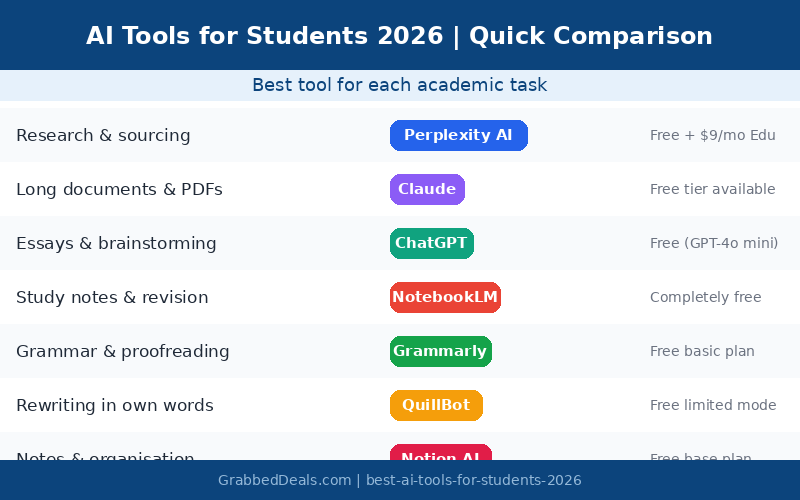
The right tool for each academic task
Rather than using one tool for everything, the most effective approach is to rotate between two or three tools depending on what you are working on.
| Task | Best tool | Free option |
| Research and sourcing | Perplexity AI | Yes, free tier available |
| Long document summaries | Claude | Yes, generous free limit |
| Essay outlines and drafts | ChatGPT | Yes, GPT-4o mini free |
| Revision and flashcards | NotebookLM | Completely free |
| Proofreading and grammar | Grammarly | Yes, basic checks free |
| Rewriting in your own words | QuillBot | Yes, limited free mode |
| Note-taking and organisation | Notion AI | Free base plan |
| Coding assignments | ChatGPT or Claude | Both have free tiers |
How to use AI tools without getting flagged for plagiarism
This is the question most guides skip over, but it matters. Universities have not banned AI tools, but they are increasingly specific about how students can use them. The rules vary by institution, so you need to check your own university’s AI policy before using any of these tools for assessed work.
Here is what generally gets students into trouble, and how to avoid it.
Use AI to understand, not to write for you
The safest use of AI tools is to use them for comprehension and research, not to generate your final submission. Ask ChatGPT to explain a concept you are struggling with. Use Perplexity to find sources. Use NotebookLM to quiz yourself on your notes. These uses are unlikely to create academic integrity issues.
If you use AI for drafting, rewrite thoroughly
If you use AI to help structure or draft parts of your work, rewrite everything in your own voice before submitting. AI-generated text often has recognisable patterns that plagiarism detection tools are increasingly trained to identify. Your final submission should sound like you.
Cite AI use where your institution requires it
Many universities now ask students to disclose when and how they used AI in their work. Check whether your institution requires this. Disclosing AI use transparently is always safer than hoping it goes unnoticed.
For official guidance on academic integrity and AI, the JISC AI in tertiary education resource and the QAA Quality Code are both worth reading alongside your own institution’s policy.
Frequently asked questions
What is the best free AI tool for students in 2026?
For most students, the combination of Perplexity AI for research and NotebookLM for studying your own notes covers the majority of academic needs, both at zero cost. If you only pick one, Perplexity’s ability to give sourced, citable answers makes it the most immediately useful for essay and dissertation work.
Is it cheating to use AI tools for studying?
Using AI to understand concepts, find research sources, and check your writing is generally accepted and encouraged by most institutions. Using AI to generate work you submit as your own, without disclosure, is where most university policies draw the line. Check your institution’s specific AI policy before using these tools for assessed work.
Does Perplexity have a student discount in 2026?
Yes. Perplexity offers an Education Pro plan at approximately $9 to $10 per month, which is around 50% off the standard $20 per month price. You need to verify your student status through SheerID using a qualifying academic email address. This plan includes Study Mode, which automatically converts uploaded files into flashcards and quizzes.
Can Claude read entire PDF textbooks?
Yes, Claude handles very long documents better than most other AI tools. You can upload full research papers, textbook chapters, or lengthy PDF documents and ask Claude to summarise, explain sections, or answer questions about the content. This is one of Claude’s biggest practical advantages over ChatGPT’s free tier for university-level work.
What AI tools are actually free for students in 2026?
Google NotebookLM is completely free with no paid tier required. Perplexity AI has a generous free tier with unlimited standard searches. ChatGPT’s free tier gives you access to GPT-4o mini for general tasks. Grammarly’s free plan covers basic grammar and spelling. Claude has a free tier with daily usage limits. You can build a solid study toolkit without spending anything.
The verdict: where to start if you are a student in 2026
You do not need to sign up for seven different AI tools at once. Here is the most practical starting point.
Start with Perplexity AI for research and NotebookLM for studying your own course material. Both are free, and together they cover the two most time-intensive parts of academic work: finding credible sources and actually learning the content you have been given.
Add ChatGPT’s free tier for essay outlines, concept explanations, and anything that needs a versatile conversational tool. Then add Grammarly’s free browser extension to catch errors before submission.
If you write a lot and want to go further, Claude is worth trying for any assignment involving long documents or complex academic analysis. Perplexity’s Education Pro plan at around $9 to $10 per month is the most valuable upgrade available if your institution qualifies.
For a full comparison of the leading AI models including ChatGPT and Claude, read our Claude AI review 2026 and our ChatGPT vs Claude vs Gemini 2026 comparison published earlier this week.
The AI tools available to students in 2026 are genuinely excellent. The only mistake is not using them.
Try these tools today
Start with Perplexity AI and Google NotebookLM. Both are free. Set up a free account on each before your next assignment and see which one fits your study style. You can always upgrade later once you know what you actually use.
External sources referenced in this article:
Perplexity AI official site (verify student pricing and Education Pro plan)
Google NotebookLM (free research and study organiser for students)
JISC AI in tertiary education guide (academic integrity and responsible AI use)
Related posts
Claude AI Review 2026: Honest Take After 2 Weeks of Daily Use
ChatGPT vs Claude vs Gemini: Which AI Actually Wins in 2026?
What Is Agentic AI? A Plain-English Guide for 2026
Explore our more pages – AI Tools & Productivity | Smartphone Ecosystems | Laptop & PCs | Audio & Sound Systems | Gaming | Photography & Videography | EV & Green Tech | Digital Marketing & SEO | Smart Home & Wearables | Tech Deals & Buying Guides |
Author bio: The GrabbedDeals editorial team tests AI tools, tech products, and software so you don’t have to. Every review and comparison on this site is written after hands-on testing with real tasks.