The best ultrabooks in 2026 weigh under 1.3kg, last a full working day on a single charge, and deliver enough performance for professional workloads. ARM chips from Qualcomm and Intel Panther Lake have closed the efficiency gap that previously favoured Apple Silicon alone. This guide covers the six best ultrabooks for frequent travellers, with honest comparisons on weight, battery life, and display quality.
Key takeaways
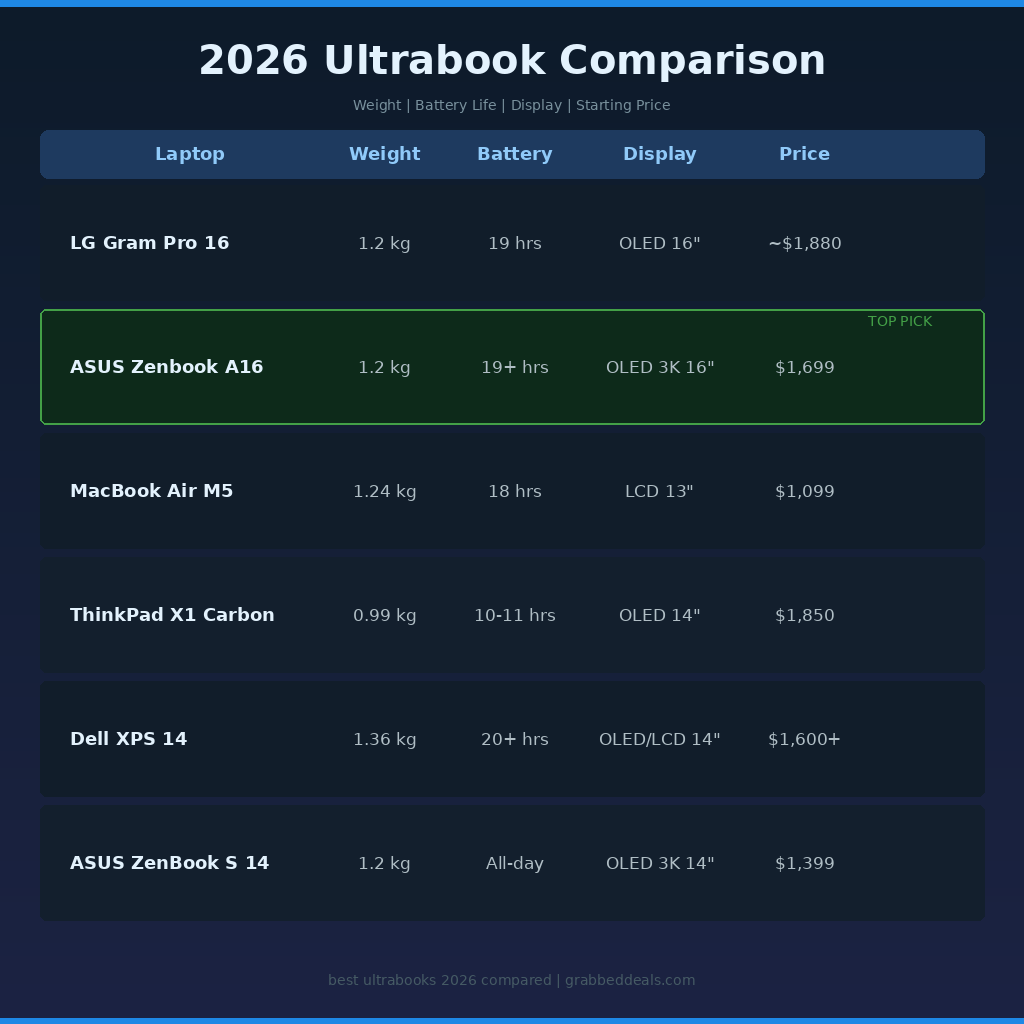
- Top overall pick: ASUS Zenbook A16 (1.2kg, 19+ hours battery, 3K OLED 16-inch, $1,699)
- Best for Apple users: MacBook Air M5 (1.24kg, 18 hours, fanless, starts at $1,099)
- Best keyboard for frequent typists: Lenovo ThinkPad X1 Carbon Gen 13 (just 986g, OLED 14-inch)
- All six picks weigh 1.4kg or less; four come with OLED displays at no extra tier cost
- Virtually every 2026 ultrabook uses soldered RAM, so always buy the RAM you need at purchase
What to look for before you buy
Three criteria separate a good travel laptop from a regrettable one.
Weight is the starting point, but charger size matters too. A laptop at 1.2kg with an 80W power brick defeats its own purpose. All six picks here support 65W USB-C charging, so a compact GaN charger is all you need to pack.
Battery life claims and real-world results differ. Expect 70 to 75% of the stated figure during mixed-use work. Prioritise models with 77Wh batteries or larger, or ARM-based chips with proven efficiency.
Display quality affects travel productivity directly. Hotel rooms and airplane windows are not kind to dim or glossy screens. Aim for at least 400 nits of brightness. OLED panels offer better contrast in dim conditions; anti-glare IPS panels work better in bright sunlight.
1. ASUS Zenbook A16 (2026): Best ultrabook overall
The Zenbook A16 is the most impressive ultrabook available in 2026. Powered by Qualcomm’s 18-core Snapdragon X2 Elite Extreme, 48GB of RAM, and a 1TB SSD, the Zenbook A16 delivers this performance behind a 3K 120Hz OLED panel while weighing just 1.2kg.
In battery testing, the Zenbook A16 lasted over 19 hours before needing a charge, making it one of the longest-lasting 16-inch laptops reviewed in 2026. For anyone who travels through multiple time zones and cannot guarantee access to a power outlet, that number matters.
The chassis uses ASUS’s own Ceraluminium material, a ceramic-aluminium blend that keeps the frame rigid without adding weight. Port selection is strong: two USB-C ports, HDMI, USB-A, and a full-size SD card reader. At $1,699 with 48GB of RAM, it undercuts competitors asking $2,000 or more for equivalent memory configurations.
Best for: Frequent travellers who want a large 16-inch screen without carrying extra weight, content creators, and professionals who run multiple applications simultaneously.
2. LG Gram Pro 16 (2026): Best battery life
LG’s 2026 Gram Pro 16 uses a new Aerominum chassis material, a blend of magnesium and aluminium alloys, to achieve an ultra-light 1,199g body with a slim 12.4mm profile. That makes it the thinnest and lightest 16-inch laptop you can buy this year.
The top-tier Intel Core Ultra X7 358H models feature OLED displays and meet Copilot+ PC requirements. All models support Wi-Fi 7 and pass MIL-STD-810H durability standards. The AMD Ryzen AI 5 model offers a slightly longer battery window with an IPS LCD display at a lower price point.
The LG Gram Pro’s 77Wh battery is quoted at up to 25.5 hours of video playback, supported by an AI Smart Assistant that analyses usage patterns to optimise power draw. Real-world mixed productivity use lands closer to 18 to 20 hours, which is still outstanding for a 16-inch machine. Port selection includes two Thunderbolt 4 ports, two USB 3.2, HDMI, and a headphone jack. Prices start from around $1,880 for the OLED Intel model.
Best for: Travellers who need a large screen and prioritise keeping a charger out of their bag for as long as possible.
3. Apple MacBook Air M5: Best for macOS users
Apple bumped the MacBook Air to the M5 chip this cycle, raising starting storage to 512GB, adding Wi-Fi 7, and delivering 18 hours of battery in a fanless design from $1,099. For anyone already in the Apple ecosystem, the M5 Air remains the easiest recommendation in the ultrabook category.
The limitations are familiar: 16GB base RAM is tight in 2026, upgrading to 24GB costs $200 extra, and there is no OLED option. Windows alternatives on this list offer more hardware flexibility and better RAM value. For Mac users, none of that matters.
Best for: Apple ecosystem users, anyone who needs a completely silent laptop, and students who want a proven, reliable machine that holds its resale value.
4. Lenovo ThinkPad X1 Carbon Gen 13: Best for frequent typists
The ThinkPad X1 Carbon Gen 13 weighs just 986 grams for a 14-inch OLED machine. The keyboard is the gold standard for ultrabooks. If you spend the majority of your day writing, the X1 Carbon is worth paying for specifically.
The Arrow Lake model starts at $1,850. Battery life in real-world testing came in at 10 to 11 hours, which is the one honest concession. It is not a one-charge-all-day machine in the way the Zenbook A16 or LG Gram Pro are. For short-haul travel or desk-to-meeting use, it is excellent. For a 14-hour flight without a socket, it needs careful management.
Best for: Business travellers who type more than they watch, professionals who value build quality and keyboard feel above everything else.
5. Dell XPS 14 (2026): Best display
Dell made significant changes to the XPS 14 this generation. Dell killed the capacitive touch bar that nobody asked for, brought back physical function keys, and added a Tandem OLED display that layers two OLED panels for brighter whites without sacrificing deep blacks. At roughly 3 pounds, it feels like a proper ultrabook again.
The base LCD model lasted over 20 hours in battery testing, helped by a variable refresh rate that drops to 1Hz when the display content is static. The OLED configurations trade some of that battery life for a noticeably better panel, and the Arc B390 integrated graphics in the OLED models handle light creative work and video editing comfortably.
The XPS 14’s keyboard has divided opinion. The low-travel, zero-lattice design with no gap between keys is a real adjustment that takes several days to adapt to. If you are a heavy keyboard user, type on one before you commit.
Best for: Travellers who prioritise display quality, anyone who works with colour-sensitive content on the road.
6. ASUS ZenBook S 14: Best budget OLED ultrabook
The ZenBook S 14 is the best entry into OLED ultrabooks without paying a flagship premium. At $1,399 with a 3K OLED 120Hz display, 32GB of RAM, and a 2TB SSD, it undercuts the Dell XPS 14 on value at the same tier. The Snapdragon X2 Elite keeps efficiency high across a full working day, and the chassis measures just 1.1cm at its thinnest point.
Best for: Travellers who want OLED at a lower starting price, those who prefer a 14-inch screen, and anyone who needs generous storage without paying extra.
Final verdict
The ASUS Zenbook A16 is the best ultrabook in 2026 for most travellers. The combination of 1.2kg weight, 19+ hours of real-world battery life, a large 3K OLED display, and 48GB of included RAM at $1,699 is a package no other model in this category matches. If you are an Apple user and the ecosystem matters to you, the MacBook Air M5 at $1,099 is the obvious alternative. For business travellers who live in their keyboard, the ThinkPad X1 Carbon Gen 13 is worth the premium. Every pick on this list is a good laptop. The question is which trade-off you are most willing to make.
Frequently asked questions
What is the best ultrabook for travel in 2026?
The ASUS Zenbook A16 is the best travel ultrabook in 2026. It weighs 1.2kg, delivers over 19 hours of battery life in real-world testing, includes a 3K OLED 16-inch display, and comes with 48GB of RAM at $1,699. No other model in this class offers all four of those qualities at that price point.
Are ultrabooks powerful enough for video editing in 2026?
Yes. The best ultrabooks in 2026 handle 4K video editing without dedicated graphics. The ASUS Zenbook A16 with its Snapdragon X2 Elite chip and the MacBook Air M5 both manage 4K timelines in DaVinci Resolve and Final Cut Pro without thermal throttling during typical edit sessions. For heavy motion graphics or 8K work, a heavier workstation laptop is still a better fit.
Is 16GB of RAM enough for an ultrabook in 2026?
It depends on how you work. For general productivity, browsing, and documents, 16GB is fine. If you run virtual machines, large spreadsheets, or keep 20+ browser tabs open alongside communication tools, 32GB is worth paying for. The critical point is that virtually every 2026 ultrabook uses soldered RAM, so you cannot upgrade it later. Buy the configuration you need from day one.
What is the lightest ultrabook available in 2026?
The Lenovo ThinkPad X1 Carbon Gen 13 is the lightest 14-inch model reviewed here at 986 grams. For 16-inch screens, the LG Gram Pro 16 and ASUS Zenbook A16 both hit 1.2kg, which is remarkable given the screen size. The MacBook Air M5 13-inch sits at 1.24kg.
Is the MacBook Air M5 worth buying over a Windows ultrabook in 2026?
For Apple ecosystem users, yes. The M5 chip is highly efficient, macOS resource management is excellent, and the starting price of $1,099 is competitive. For Windows users, the ASUS Zenbook A16 offers more RAM, a larger OLED display, and longer battery life for $600 more. Windows ultrabooks also offer more hardware variety, touchscreen support, and better upgradeability at purchase.
Related posts
Author: The GrabbedDeals editorial team tests and reviews tech across every major category, from smartphones and laptops to AI tools and smart home devices. Our buying guides are built on the latest real-world data, independent expert reviews, and current pricing.
Explore our more pages – AI Tools & Productivity | Education & Learning | Travel | Smartphone Ecosystems | Laptop & PCs | Audio & Sound Systems | Gaming & Photography | EV & Green Tech | Digital Marketing & SEO | Smart Tech Deal & Buying Guides