Building a gaming PC in 2026 is the smartest way to get serious performance at a price prebuilt systems cannot match. AMD’s Ryzen 9000 series and Intel’s Arrow Lake platform have both matured this year, giving builders two strong options at every price point. This step-by-step guide covers every decision from platform choice to first boot, with specific part picks for three budgets.
Key takeaways
- AMD Ryzen 9000 series leads on multi-core workloads and content creation alongside gaming
- Intel Arrow Lake edges ahead in single-core gaming performance at similar price points
- A capable 1080p gaming build starts from around £700 in May 2026
- The GPU is always your most important budget allocation, regardless of platform
- Building your own PC cuts cost by 20 to 35% versus equivalent prebuilt systems
Step 1: Choose your platform, AMD Ryzen 9000 or Intel Arrow Lake
This is the first and most consequential decision in your build. Both platforms are strong in 2026, but they suit different builders.
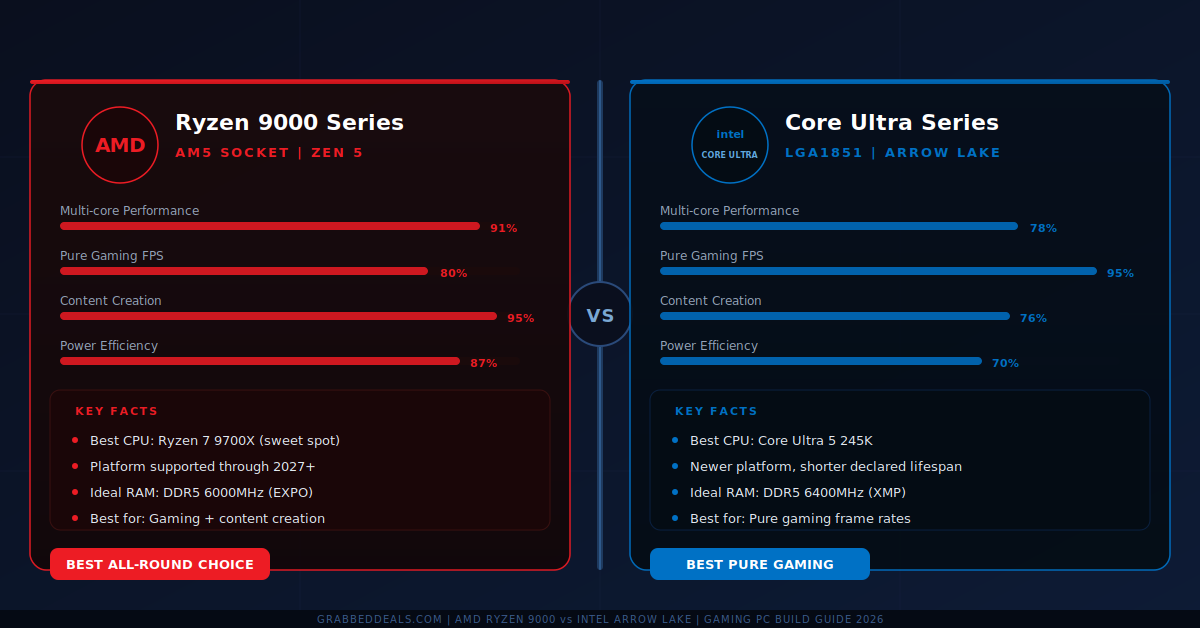
AMD Ryzen 9000 series (AM5 socket) is the better choice if you edit video, stream while gaming, or run CPU-heavy tasks alongside games. The Zen 5 architecture leads on multi-core performance and the AM5 platform has a confirmed upgrade path through at least 2027. The Ryzen 7 9700X is the performance-per-pound sweet spot for most builders.
Intel Arrow Lake (LGA1851 socket) holds a slight single-core edge for pure gaming frame rates at equivalent prices. If gaming is your sole workload, the Core Ultra 5 245K is a strong option. The performance gap between platforms is narrow enough in 2026 that price and ecosystem should often decide it.
Verdict: AMD wins for versatility. Intel wins slightly on raw gaming frame rates. If you are unsure, AMD’s upgrade path gives better long-term value.
Step 2: Set your budget and allocate it correctly
The most common mistake in PC building is spending too little on the GPU and too much everywhere else. Your graphics card does the heavy lifting for gaming.
Budget build (£700 to £900): Allocate roughly 40% to the GPU, 20% to the CPU, 15% to the motherboard, and the remainder to RAM, storage, and case. An AMD RX 7600 XT or Nvidia RTX 4060 paired with a Ryzen 5 9600X delivers solid 1080p gaming at high settings.
Mid-range build (£1,000 to £1,400): Stretch GPU allocation to 45%. An RTX 4070 Super or RX 7800 XT with a Ryzen 7 9700X is a capable 1440p build. This is the most popular tier in 2026 where cost-to-performance peaks.
High-end build (£1,500 to £2,200): An RTX 4080 Super or RX 7900 XTX paired with a Ryzen 9 9900X handles 4K gaming and heavy creative workloads. Above this price, diminishing returns set in fast.
Step 3: Pick your motherboard and RAM
Your motherboard must match your CPU socket. AM5 boards for Ryzen 9000 and LGA1851 boards for Arrow Lake are not interchangeable. For AMD, a B650 chipset board covers everything most builders need. For Intel, Z890 is the mainstream Arrow Lake choice.
RAM: DDR5 is now standard on both platforms. Aim for 32GB minimum at 6000MHz on AMD or 6400MHz on Intel. Do not build with less than 32GB in 2026 if you plan to game with a browser and Discord open.
Step 4: Choose your GPU and power supply
The GPU drives your gaming experience more than any other component. Buy the best GPU you can afford within your Step 2 budget. Nvidia’s RTX 40 Super series and AMD’s RX 7000 series are both excellent in 2026. At the budget tier, price and availability should decide it.
Power supply minimums: Budget build: 650W 80+ Gold. Mid-range: 750W 80+ Gold. High-end: 850W 80+ Gold or better. Never cut corners on the PSU. Seasonic, Corsair, and Be Quiet have strong 2026 reliability records.
Step 5: Select storage and your case
Storage: Install your OS on a 1TB PCIe 4.0 NVMe M.2 SSD, around £60 to £80 in May 2026. Add a secondary 2TB SATA SSD for game storage if budget allows. Avoid HDDs as primary drives.
Case: A mid-tower ATX case suits most builders. Look for two front intake fans and clearance for your CPU cooler. The Fractal Design Pop Air and Lian Li Lancool 216 are rated for airflow and build quality this year.
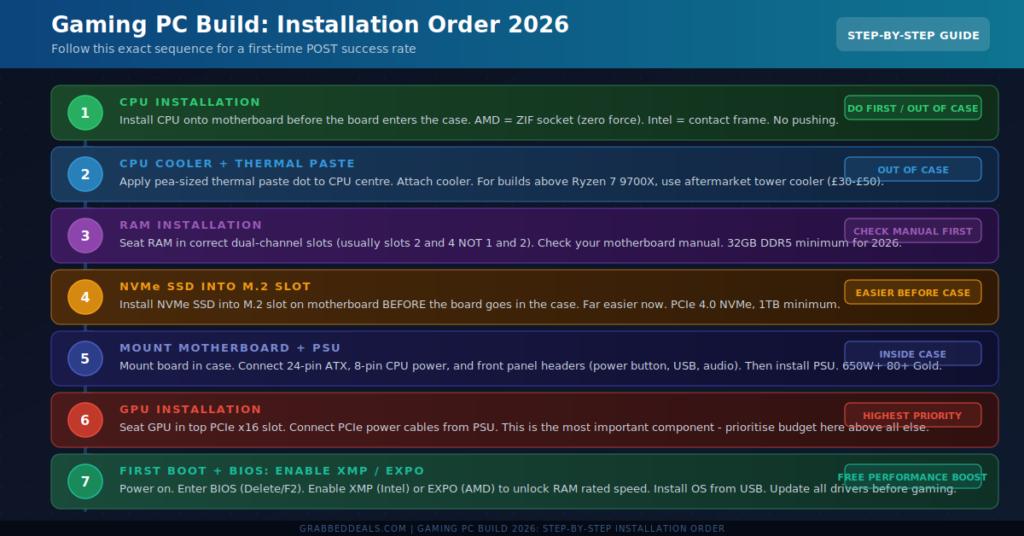
Step 6: Install components in the correct order
Follow this sequence to avoid dismantling and redoing work:
- Install the CPU onto the motherboard before the board enters the case. AMD uses a ZIF socket (zero insertion force). Intel uses a contact frame. Neither requires force. If you are pushing, stop and check the orientation.
- Apply a pea-sized dot of thermal paste to the CPU heat spreader and attach the cooler. Stock Ryzen 9000 coolers work for budget builds. Above the 9700X, budget £30 to £50 for an aftermarket cooler.
- Seat RAM in the correct dual-channel slots. Most boards want slots 2 and 4, not 1 and 2. Check your motherboard manual first.
- Install the NVMe SSD into the M.2 slot before the board goes in the case. Far easier at this stage.
- Mount the motherboard in the case. Connect the 24-pin ATX, 8-pin CPU power, and front panel headers (power, USB, audio). Install the PSU.
- Seat the GPU in the top PCIe x16 slot and connect PSU power cables.
- Connect remaining case fans and route cables behind the motherboard tray.
Step 7: First boot, BIOS setup, and OS installation
Before powering on, check every connector: the 24-pin ATX, the 8-pin CPU power cable, and the PCIe power cables to the GPU. Power on and watch for the BIOS screen. If the display stays black, reseat the RAM first. This solves the majority of no-POST issues.
Enter the BIOS (usually Delete or F2) and enable XMP on Intel or EXPO on AMD. DDR5 kits default to 4800MHz out of the box regardless of the speed on the label. Enabling this profile is the most commonly skipped free performance upgrade in any new build. Set your boot device to the NVMe drive, install Windows 11 from a USB, then update GPU drivers, chipset drivers, and Windows before your first gaming session.
Final verdict
Building a gaming PC in 2026 is more accessible than it has ever been. Choose AMD Ryzen 9000 for versatility and a long upgrade path. Choose Intel Arrow Lake if pure gaming frame rates are your only priority. Allocate the largest share of your budget to the GPU, do not underspend on the power supply, and enable XMP or EXPO on first boot. Follow the seven steps above in order and your build will post first time.
Frequently asked questions
Is it cheaper to build a gaming PC or buy a prebuilt in 2026?
Building your own gaming PC is 20 to 35% cheaper than buying an equivalent prebuilt. Prebuilt margins have increased following component demand spikes this year, making self-builds more cost-effective than at any point since 2022.
How long does it take to build a gaming PC for the first time?
Most first-time builders complete a build in 3 to 5 hours including cable management. Watching a platform-specific build video beforehand cuts that time and helps with front panel header placement, the most fiddly part for beginners.
Should I use AMD or Intel for gaming in 2026?
Intel Arrow Lake has a small single-core advantage for pure gaming frame rates. AMD Ryzen 9000 leads on multi-core workloads. If gaming is your only use case, Intel is marginally better. If you also stream or create content, AMD is the stronger platform.
What GPU should I buy for 1440p gaming in 2026?
The Nvidia RTX 4070 Super and AMD RX 7800 XT are the best value 1440p options in the £400 to £480 range. Both handle high to ultra settings above 60fps consistently, with the RTX 4070 Super leading on ray tracing.
Can I upgrade a 2026 gaming PC build later?
Yes. AMD’s AM5 platform supports future Ryzen generations through at least 2027. Intel’s LGA1851 has a shorter declared upgrade window. AMD is the safer long-term choice if you plan to swap your CPU within 2 to 3 years.
Author: The GrabbedDeals editorial team tests and reviews tech across every major category, from smartphones and laptops to AI tools and smart home devices. Our buying guides are built on the latest real-world data, independent expert reviews, and current pricing.
Explore our more pages – AI Tools & Productivity | Education & Learning | Travel | Smartphone Ecosystems | Laptop & PCs | Audio & Sound Systems | Gaming & Photography | EV & Green Tech | Digital Marketing & SEO | Smart Tech Deal & Buying Guides